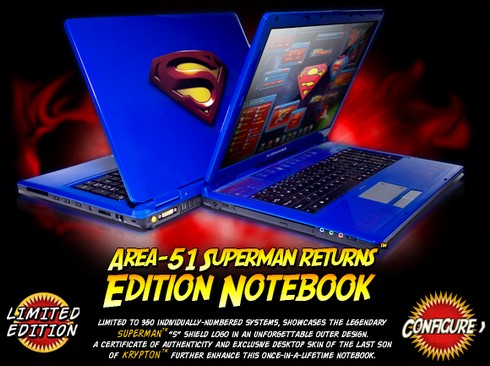
Ok, this absolutely rocks: a Superman-themed Alienware notebook! The colouring and design of the case is simply awesome. I thought at first the logo was raised plastic or resin, but it turn out it’s flat and airbrushed. Still very cool. The laptop itself is no slouch – the base config sells for $2239 USD, but you can deck it out with a Core 2 Duo processor at 2.33 Ghz, two 200 GB hard drives in a RAID array, 2 GB of RAM and dual TV tuners…for a mere $4206 USD. This would be one fast notebook, and it looks so damn good! I’m not notebook shopping until Q1 2007 when the new Vista models come out, so I won’t even consider this…but it sure looks nice! I’m intrigues by the branding partnership here as well – it’s not something I’ve seen very much of, but I’d sure like to see more. I’d kill for a Wolverine-themed notebook. 😉
Category: Internet & Technology
I Went a Little Monitor Crazy This Week
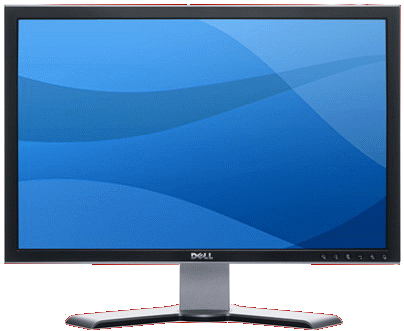
Two days ago I did something kind of fun and scary at the same time: Dell had their 24″ wide screen monitors on sale for $699 CAD yesterday, and I ordered three of them. Yes, three – that’s 72 inches of monitor goodness. Why? Well, I’ve had my eye on an upgrade to my dual 20.1″ Dell LCDs for a while now, and I’ve been looking hard at how I use all my computers in my home office, and I think some different hardware will help me get more done, faster. The three Dell monitors are part of the plan…more details to follow later. I also opted to lease them, which is something I’ve only ever done with computer equipment once before. Three of these beauties for $58 per month over four years – I qualified for their best financing rate (9.99%), so it’s not too bad in terms of overall cost of leasing ($490.86). And, yeah, these are the same monitors that I bought back in August ($50 less now) and ended up returning a few days later. Am I a glutton for punishment? Maybe. I want big monitors, and I’m really hoping that four months later, Dell has addressed this issue. There aren’t any monitors on the market that compare to these for $699 each. I read up in their forums before ordering, and it seems like the latest batch of revision A03 monitors no longer have the banding problem. How am I going to use such big monitors? Well that’s a tale for another day…
[as a side note, I’m realizing now one of the dis-advantages of having a template with a non-white background…if I end up posting images designed for white backgrounds very often, the background might need to change]
When Software Should Stop Bad User Behaviour
In grinding through the 1614 email messages I had when I opened Outlook this morning, one email in particular stood out to me: it was an email with an attachment that was 31 megabytes in size. THIRTY-ONE FREAKING MEGABYTES. That’s beyond ludicrous, that’s well into the “will crash some email clients even if it happens to make it through and doesn’t kill your entire Inbox and cause all your other email to bounce” category. Now, the person sending it likely didn’t realize it was so big (I sure hope they didn’t), but here’s where smart software should come into play: an email client simply shouldn’t allow a user to send an email attachment that big without a polite warning, stating something such as “The attachment you’re trying to send is very large – it may not be received properly”. The threshold would be set fairly high – likely around 10 MB before it would trigger the warning – and there should be an option for users to ignore the warning if it’s something they do often and know that the person on the other end can accept large files. No one wants a return to irritating Clippy-like helpers, but there’s just no way that intelligent software should let users do something as foolish as send a 31 MB email attachment.
Middle Button Click to Open a New Firefox Tab
On all of my PCs, I have the middle mouse button configured to act as a browser back button, allowing me to quickly go back to the previous page I visited rather than having to click the back button or use the ALT+left arrow key. I spend so much of my life online, saving a few seconds or (more importantly) wear and tear on my mousing arm is important to me. So I was a bit frustrated that I couldn’t seem to configure Firefox 2.0 to allow me to use the middle mouse button on my Microsoft mouse to open links in a new tab when I used the middle mouse button to click on a link. At first I thought I needed a Firefox add-on, but after some research it turns out that by default the middle-click button opens links in new tabs – but I never saw it working because my Microsoft mouse software always overrode it. By going into the Control Panel > Mouse > Buttons settings, and selecting the check-box for “Enable Program-Specific Settings”, I was able to select the Firefox executable and set the Wheel Button to Middle Click. Now in Firefox the middle click on the mouse button will open up links in new tabs, while in other programs it will go back.
How To Re-name MSN Messenger / Windows Live Messenger Buddies
Ok, this might fall into the “Jason, you didn’t KNOW that?” category of things on this blog, but it’s always been a pet peeve of mine when people on my MSN Messenger (now Windows Live Messenger) list use something other than their real name as their login name. People tend to fall into one of three categories here:
- They’re using their email address as their sign-in name, usually because they don’t know any better, or how to change it. Since Passport email accounts are often not the email address you use to communicate with them on, it’s hard to remember that [email protected] is really someone I know. Especially if it’s someone I only chat with very rarely, I quite often have to ask “Who is this?” and they act surprised that I can’t figure out who they are from their email address.
- They’re using their first name only, or a handle. Ok, fine if you have a unique name (Janak, Darius), not so fine if you’re one of four Chris’ in my list.
- They’re changing their name to change their mood. I actually like the “mini blog” concept where I can glance at a contact’s name and see what’s new, or how they’re feeling, but not when I can’t find them in my list because they don’t use their name at all. So one day they show up as “It’s Raining” and another day they’re in a different part of my list as “Zzzzz”. In older versions of Messenger, I’d do this by changing “Jason Dunn” to “Jason Dunn – so sleepy” or something similar. So I’d keep my name in there, and add my one-line message after it. Now with Messenger Live you actually have a the ability to append a unique message after your name, so it’s much easier to create personal messages.
Way back in the day when I was using ICQ, you could change the name of the person on your list, essentially overriding their choice on your end so you knew who they were. MSN Messenger was missing that feature for quite some time (or maybe I never discovered it at all), and just today I discovered that you can re-name people on your list. You’d think you’d be able to change via a right-click, right? Well, you can, but “Add a Nickname” sure isn’t the same to be as “Rename” (which I just realized today as well – it’s a day of discovery!). You have to click on a contact and press F2 – yeah, that old Windows standby F2. Sure, I’m probably the last one on the planet to figure this out, but in case I’m not, now you know.
Cool New Windows XP Theme
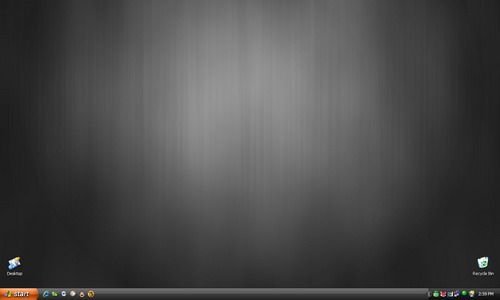
There’s a new Zune theme for Windows XP that’s quite cool – I dig the black title bars and the orange start button. Anything but the green/blue combo until Vista arrives! You can download the theme here, although apparently the theme needs some tweaking in order to be perfect. I didn’t like the default background very much, so I replaced it with the above wallpaper. I’ve collected it, and a few other wallpapers that would go nice with the Zune theme, into a single ZIP file. Enjoy! [a note to you wallpaper graphic designers out there, embed an URL or something into the EXIF data of the JPEG so people can figure out where they got the image from]