Jeremy Toeman’s 10 Tips for PR People

Jeremy has put together a list of 10 tips for PR people that are working with bloggers, and it’s a great read. Here’s one of his tips:

“Do your homework.  Most blogs have an ‘about’ page, in which you’ll discover the blogger’s full-time job (assuming it isn’t blogging), region of the country/world where they live, topics they prefer to cover, how they’d like to be contacted (bonus tip: IM or email is almost always the answer, not the phone), etc.  Read this and understand it.  Furthermore, doing a little background research will quickly tell you whether or not the blogger is good at keeping secrets/embargos (some do, some don’t – learn the difference).”

I’ve received probably 100+ press releases from PR firms in the past 30 days leading up to CTIA, and it’s stunning how completely random and un-targeted they are. I can tell that 99.9% of the people sending them to me have never visited any of my sites, and know absolutely nothing about me or what kinds of things I cover. It’s no surprise then that I delete 99.9% of them without wasting my time reading them.

Jeremy also has a great post covering 10 tips for bloggers working with PR people, and it’s also a good read. Having a background in PR myself, I tend to know what the PR people want and don’t want – but if I’m honest with myself I have to admit that #10 (Setting Expectations) is my biggest problem. I have a real struggle finding the discipline to write reviews in a timely, consistent manner – and more often than not I find myself apologizing to PR people for taking so damn long to write my reviews. It’s something I really wanted to improve upon in 2007, but I have to admit it’s proving to be harder than I thought. I’ll keep at it though!

Well Wouldn’t You Know It…

It figures that the week I’m on a contract writing gig my laptop decides to flake out on me: for some bizarre reason the “e” key is partially sticking and not responding to key presses properly. I was wondering why, when I was writing an article on the airplane, I kept missing the letter “e” when typing. As a touch-typist, you get used to hitting every key with the same amount of force – not too much, not too little – and it’s hard to change the muscle memory in just one finger on one key. I don’t quite know what the problem is, but I can’t risk opening the laptop here (nor do I have the proper tools) so I’ll just suffer through it and try to remember to pound the “e” key whenever I need that all-too-often used vowel.

I’m looking at getting a Sony TX series laptop, largely because the Fujitsu P7230 (the upgrade of my laptop) isn’t all that impressive. I’m holding back though because I generally loathe Sony as a company, and most of their products. I wish Samsung sold their laptops in North America!

I’m in Sunny Florida

I’m down in Florida doing a blog project for Microsoft, and I had to pack up and leave on my birthday (yesterday, the 25th). I wish I could say that I had a great birthday day, but I woke up pretty early (when I think it should be mandatory that you get to sleep in until whenever you want on your birthday), packed my bags, then got on a plane for Orlando. After a very looooong five hour flight sitting next to a family that brought greasy fast food with them onto the plane, I made it to Orlando. I did a poor advance planning job and didn’t prepare any ripped DVDs or TV shows to watch (one of my favourite activities to do on a flight), so I ended up reading a lot of my book, iCon.

Then I had to wait 30 minutes for my bag to show up on the luggage belt. After waiting another 20 minutes in line for a taxi, I got onto a taxi shuttle that went to almost every other hotel before mine first, finally made it to my hotel, waited another 10 minutes in line as the single desk clerk checked in the three people in front of me with Japanese names that he couldn’t spell, stumbled exhausted into my room, then waited an hour for a greasy pizza to show up because I was too tired to be bothered with going out to find food myself. Quite the adventure. I already wish I was back home, but work is work, so once more unto the breech I go!

When AdSense Overrules Content: It’s Ugly

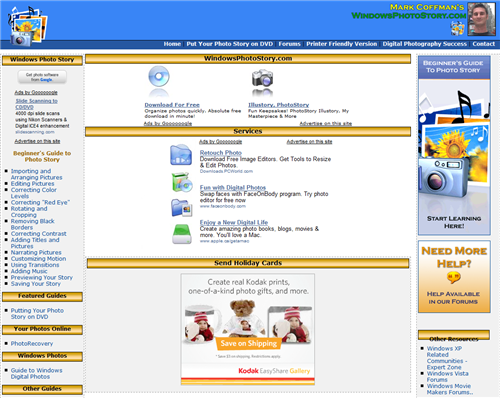
Can you find the content on this page? I couldn’t when I visited it – until I scrolled down the bottom half of the page. And notice too how the icons placed next to the Google AdSense links make it seem like the AdSense links are navigation/story elements meant to be clicked on.

adsense-overload.png

I’ve met Mark before, and he was a nice fellow, but I’ll never visit this site again because it represents the worst in what happens when a hobby site, born of a personal passion for a topic, becomes commercialized in an ugly way. I’m not one to begrudge anyone making money online, it’s how I pay my bills after all, but when a site is more advertising than content, there’s a serious problem. When your visitors have to scroll down to search for the content, you’ve crossed over the line from providing legitimate content supported by ads into the dark realm of an advertising site “supported” by legitimate content. When your content is secondary, you have to ask yourself why you’re even offering it other than wanting to make money off it.

Does Mark have the right to hide his content among advertising? Certainly. But does it hurt his credibility when everything about the site is designed to trick people into clicking on ads instead of finding the content they want? You bet it does. I always struggle with the fine line between content and advertising on the Thoughts Media properties, but I find that if I keep my readers first and foremost in my mind, and think like them, I usually end up integrating advertising in such a way that it doesn’t interfere with what people really want, which is the content. And I also hope (and know) that if I ever cross the line with my sites, people invested in them (community and team members) will smack me upside the head 😉 and remind me that I’m not in this for the money, I’m in it because I love technology and community.

RockPointe “Compassion in Action” Photo Shoot

On Sunday the 18th of March, 2007, members of RockPointe church, along with interested visitors, assembled in the Crowfoot movie theatres to view a message from U2’s Bono and Bill Hybles about combating AIDS and extreme poverty in Africa. It was, frankly, a nightmare to shoot because of the low lighting. The ultra-high ceilings in most locations made a flash bounce impossible, so I ended up shooting without a flash for most of the shots. The end result is ISO 1600, fairly grainy photos – some of which I transformed into black and white where the grain helps the image have more impact. Looking at them at smaller sizes (sub-1000 pixels), they don’t look too bad actually. That’s the thing I always forget about ISO noise, odds are few people are going to be staring at the photos on a 24″ LCD monitor running at 1920 x 1200 like I am…and when the photos are smaller, the ISO noise tends to vanish.

This was my first real use of Adobe Lightroom, and I was quite impressed with it (for the most part) – look for a review of it on Digital Media Thoughts. Here’s a selection of some of my favourite B&W images…

138079008-s.jpg

138080407-s.jpg

138081919-s.jpg

138082424-s.jpg

138083662-s.jpg

You can check out the rest of the gallery if you wish.

Finally Going to Gnomedex Am I

That’s right, after years of threatening to go to Gnomedex and harassing Chris Pirillo in person, I finally bit the bullet and registered to attend in August of this year. The $500 USD price tag was, frankly, a lot for me to swallow – I think it’s the first conference that I’ve ever paid to attend. But I’m a fan of what Chris has achieved in the online world and have heard excellent things about Gnomedex over the years: the speakers, the events, and the networking. So I’m going. Are you? If so, let me know and we’ll connect there.

Movies Worth Watching: 300

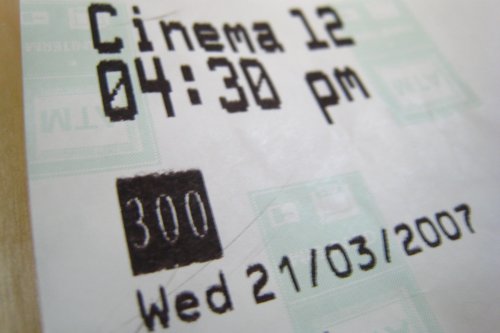
300-movie-ticket.JPG

300 was one of the most anticipated “must see” movies on my mental list, but it took three attempts at going to the movie theatre before I finally saw this movie. My jaw was on the floor much of the time. So much has been said about the movie, I won’t repeat it all here, but if you’re the kind of person who’s heart starts pumping when the action starts, this is a movie for you. There are movies that re-define genres, and in the same way that The Matrix re-defined the cyberpunk action movie, 300 sets a new high bar for old school, hand to hand combat movies. The plot, while not thin, isn’t overly complicated either. There are no real surprises here, though all parts are acted out ably enough. The real gem in this movie is the cinematography, special effects, and choreographed fight sequences. It looks like the graphic novel is was pulled from. The movie has the touch of true mastery, where nothing is out of place and everything is executed with a perfect clarity of vision that is lacking from so many movies. I don’t say this often, but I may very well go see this again in the theatres, and will certainly be picking it up on (hopefully) HD-DVD when it is released.

300-4.jpg

Clever Spam I Can’t Seem to Stop

I’ve been getting the following spam, one per day, over the past several months:

we email advertise your charity web site to 7,500,000 people. free.
http://www.emailsolutioncorp.com

I was receiving spam to the address I had on file with GoDaddy for my domain names, so I changed it, and included “nospam” in it, hoping that the spamming software would filter it out as being invalid. The very next day I was receiving spam to the new email address from this same spammer. Amazing. I know there are privacy options for domain registration, but it would cost me $500+ per year given the amount of domains I have, so it’s not really an option.

So what about local blocking of the spam? The problem is that the header is constructed in such a way that there’s no sender information whatsoever. Check this out (I’ve purposefully broken the email address used):

Return-path: <87[[email protected]>
Envelope-to: 87[[email protected]
Delivery-date: Thu, 22 Mar 2007 10:49:51 -0600
Received: from [70.113.28.110] (helo=cpe-70-113-28-110.austin.res.rr.com)
by rampart.thoughtsmedia.com with smtp (Exim 4.63)
(envelope-from <87[[email protected]>)
id 1HUQU3-0000fR-3s
for 87[[email protected]; Thu, 22 Mar 2007 10:49:51 -0600
To: 87[[email protected]

Outlook 2007 can’t spam block it because there’s no sender email address or domain. I also can’t create a rule because the email has to have a subject or sender. That IP address traces back to the Road Runner network, meaning it’s someone’s PC with a cable modem, likely infected by a bot and sending out spam without the user knowing (people like that should be blocked from accessing the Internet at all until they’ve fixed the problem).

Other than pressing the delete key, I’m out of ideas. I’m just thankful there aren’t more spammers out there doing this!

Firefox is Pissing Me Off: High CPU Usage When Displaying Flash

digital-trends-flash-ad-100-cpu-usage.JPG

My friend Ian Bell runs Digital Trends, a great site, but lately I’ve been cringing whenever I’ve visited it. Why? Because invariably I see the same thing every time: a Pioneer Flash ad that causes the CPU usage of any computer I’m on to shoot to 100%. It’s not just Digital Trends or Pioneer ads that cause the problem: all sorts of Flash ads cause this problem and it’s only ever in Firefox. It’s been going on for years, yet no one at Firefox or Macromedia/Adobe has ever bothered to fix it. Particularly on my small laptop with it’s single-core 1.2 Ghz CPU, when it’s gunning at 100%, the whole system will grind to a halt. It’s getting so frustrating I’m getting close to switching back to IE7.

UPDATE: I did a bit more testing after updating to Firefox 2.0.0.3 and it seems that there’s only certain frames in the Pioneer Flash animation that’s causing the problems. If you look at the Pioneer ads on this page, you’ll see there’s a part where the rain starts falling in the ad…that’s when my CPU spikes:

flash-rain-high-cpu.PNG

This mirrors what I saw with some Pocket PC Techs banners that were running on Pocket PC Thoughts for a while – the designer used a special type of Flash animation to move the snowflakes across the screen, and it caused the CPU spikes as well – falling snowflakes, falling rain…I’m seeing a pattern here.

Developers Who Point the Finger At Someone Else

One of my long-standing frustrations in the realm of geekdom is when I run into software developers who, when faced with a problem with their software, point the finger at another company or application and expect someone else to fix the broken experience for their customer. A year ago this month I ran into a repeat problem with FTP Voyager, a product I had been using for years – I’d upgraded faithfully year after year. In other words, I was a long-time customer of theirs with an investment in their product. Here’s the email I sent (remember this is March 2006):

“I reported a bug a few months ago where FTP Voyager uses up 99% of the CPU and it turned out to be caused by the Windows XP SP2 Firewall being turned on. I just installed FTP Voyager on a brand new PC (my old one died) and did an upload, and again I was smacked with the 99% CPU use bug because I had forgotten to turn off the XP Firewall. I’m surprised this bug hasn’t been fixed yet, because asking your users to deactivate security measures just to be compatible with FTP Voyager seems silly, it not downright irresponsible. When is this bug going to be fixed?”

My basic point was that their product was incompatible with the default configuration of a Windows XP SP2 machine. It seemed pretty cut and dry to me: they needed to fix their product. The response I received from one Louis C. Branch of Rhinosoft had a very different line of thinking:

“I don’t consider the XP firewall to be a security measure. It is not a particularly effective firewall and does not respond to configuration as it should. This is not a bug in FTP Voyager, but a bug in the XP firewall implementation. I recommend using the Kerio or Zone Alarm firewalls if you feel the need to put a software firewall in place on an XP box. Please let me know if there’s anything I can do for you.”

There are a lot of ways Rhinosoft could have approached this problem – having a user prompt upon install that suggested de-activation of the Firewall, or them actually coding their product to work with the XP Firewall (like every other FTP program seems to be able to do). Instead, they pointed the finger at Microsoft and the XP Firewall and expected the customer to deactivate a security feature of their operating system – sure, it might not be as effective as a dedicated product such as Zone Alarm, but it’s better than nothing. And if I did de-activate it, I’d have to remember to turn it on when connecting to WiFi access points on my laptop every time.

This was the last straw for me (I should have seen the writing on the wall when I had to convince them that multi-threaded upload/download was useful) and I switched to using SmartFTP – a program that, interestingly enough, requires no firewall configuration. Go figure.