Writing Cheques Like It’s 1993: Having a Dedicated Chequing Account

Personal finance management and investing is one of my newer personal passions, so I’m going to start blogging about those topics here on a regular basis. I’d love to hear from people on how they manage their money!

I still use cheques now and then (those are “checks” for you ‘muricans) but they tend to be larger values (my son’s school tuition, summer camps, community HOA fees, etc.) and I despise the unpredictability of not knowing when they’ll be cashed. I’ve been burned more than once by having a cheque I’d forgotten about be cashed, pushing my account into a negative balance and triggering an overdraft move of money from another account (and sometimes a fee).

Leaving money in my chequing account is a pain since I zero it every week (on Thursday nights to be precise). If someone was doing old-school cheque-book accounting, and keeping a running tally, they wouldn’t have this problem – but I just can’t run my financial life using a model so restrictive, and, frankly, cumbersome. I wanted a solution that would work for my financial management style.

I decided instead to take an approach that would give me more control, but took the essence of the chequebook approach: you make sure for every cheque that is written, there are sufficient funds to cover it, and those funds are never touched because they’re already spent. I created a “Write a Cheque” bank account where I move the exact amount of the cheque over from my main chequing account, and leave it there. So over a period of weeks the “Write a Cheque” account goes to zero as each cheque is cashed. I’ve been using this method for several months and it has completely solved my challenge.

How do you deal with cheques in your day today financial life?

Photo above courtesy of eComm Merchant Solutions.

True confession time: when I go back to Canada, I watch #Nashville. It's not on Netflix USA, so it's my guilty pleasure, indulging in overly complex drama with a country music backdrop.

True confession time: when I go back to Canada, I watch #Nashville. It's not on Netflix USA, so it's my guilty pleasure, indulging in overly complex drama with a country music backdrop.
Posted by Instagrate to WordPress

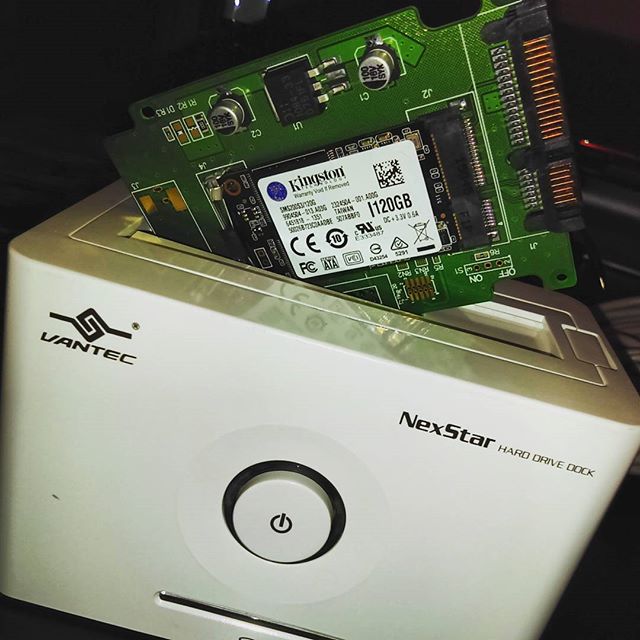
It's like storage Inception: an mSATA SSD in a 2.5" SATA adaptor going into a hard drive dock. All to do a secure drive wipe! #geekception #storage

It's like storage Inception: an mSATA SSD in a 2.5" SATA adaptor going into a hard drive dock. All to do a secure drive wipe! #geekception #storage
Posted by Instagrate to WordPress

Had a blast at the #calgarystampede today with my family. We took the sky ride and took in the spectacle that is the Greatest Outdoor Show on Earth! Also, nearly melted from the sheer heat of the sun.

Had a blast at the #calgarystampede today with my family. We took the sky ride and took in the spectacle that is the Greatest Outdoor Show on Earth! Also, nearly melted from the sheer heat of the sun.
Posted by Instagrate to WordPress

The birthday present I requested from my brother: his amazing home made #sushi the next time I was in town. #nomnom @therealaarondunn

The birthday present I requested from my brother: his amazing home made #sushi the next time I was in town. #nomnom @therealaarondunn
Posted by Instagrate to WordPress

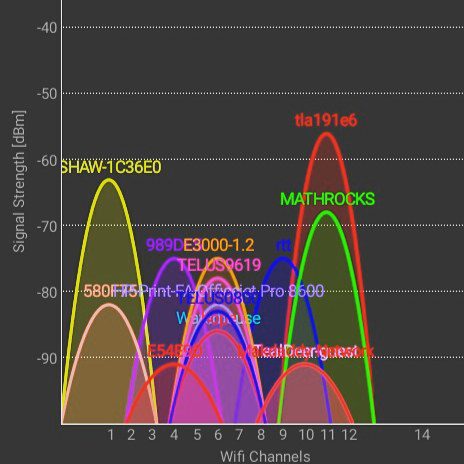
This is why residential Wi-Fi is such a train wreck for many people. Look at all these access points on the 2.4ghz spectrum! Time to move my in-laws to a 5ghz spectrum router.

This is why residential Wi-Fi is such a train wreck for many people. Look at all these access points on the 2.4ghz spectrum! Time to move my in-laws to a 5ghz spectrum router.
Posted by Instagrate to WordPress

One of the things I miss about #Canada: our money is both beautiful and tough, just like the country itself. #toonie #looney

One of the things I miss about Canada: our money is both beautiful and tough.

Farewell Old Blog Template…I Knew Ye Well

November 4th, 2006, I started this blog. And right from day one, I had a gorgeous theme for it, designed by my friend Darius Wey. Darius is one of those guys who won the talent pool lottery: he can code, design, write, photograph, and generally create something out of nothing at a level that surpasses most mere mortals (myself included). It’s not a surprise that he went on to big things in the Australian healthcare technology industry.

Back to the template…all my Thoughts Media blog templates were designed for maximum readability, and embedding of white-background graphics (since that’s what PR companies product shots 99% of the time). For my personal blog, I wanted something…different. I wanted it to reflect a completely different sense of style, something deeper to my core aesthetic, and Darius created this beautiful design that has been with me for almost a decade, aptly named Bushido. I wanted to immortalize it in a blog post so I’d never forget how gorgeous it was…

Original-Blog-Theme-Darius-Wey

This being 2015, I needed a template that was mobile-friendly from the ground up, and something that, yes, maximized readability (because this is my only public place to publish long-form content now). I’m slowly trying to work some of the graphical elements from the previous template into my current one…

Farewell blog template of 2006!

Gas in Alberta is 34% more expensive ($1.08/litre, $4.08/gallon) than where I live in the USA, even though a great deal of oil comes from here. Good reminder that I should never complain about gas prices. #gasprices

Gas in Alberta is 25% more expensive ($1.08/litre, $4.08/gallon) than where I live in the USA, even though a great deal of oil comes from here. Good reminder that I should never complain about gas prices.

Outlook 2013: Changing Search Default From Current Mailbox to Current Folder

One of the most powerful functions in Outlook is search, and in Outlook 2013 Microsoft made a change for the worse. From my perspective, if I’m searching for an email in my inbox, or my sent items folder, I want to see results only from that folder. Showing me results from across my entire inbox makes for a muddled mess, and having to change the drop-down from “Entire Mailbox” to “Current folder” every single time was a pain. I’ve been running Outlook 2013 since it first came out on my personal email, but not until this month was I offered Outlook 2013 for work. At work, Outlook is the other half of my brain, so searching through emails quickly and easily is critical.

Thankfully, there’s an an easy fix:

Select File > Options > Search > Include results only from Current Folder, then click OK.

outlook-2013-default-search-current-folder-not-current-mailbox