How To Disable Vista’s Offline File Sync Center

disable-vista-offline-files

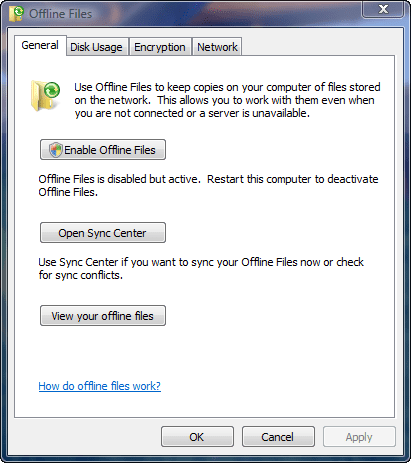
If you’ve ever been browsing a network drive and right-clicked on a folder and accidentally selected “Always Available Offline” (it’s easier to do than it sounds), you’ll have no doubt seen the little green Sync Center icon that comes up every time from that point forward – even when you’ve de-selected all the offline sync folders, and it has absolutely nothing to do, it still loads at every boot. The solution to stopping it isn’t found inside the Sync Center itself – where you’d think it would be – instead you have to go to the Control Panel and double-click on Offline Files. Once there you’ll see the above window, and it’s as simple as clicking on “Disable Offline Files” (in the image above, I’ve already done this) and rebooting. Voila – no more Offline File Sync Center.

MotionBox Video Tests

I signed up for an premium account with MotionBox, a video hosting service, because I finally got fed up with YouTube’s very lame 4:3 aspect ratio video player – it just really sucks for 16:9 video. This is a test post I’m doing so I can compare a few different versions of the same video to check out how to best optimize the content I’m creating. You can probably ignore this post unless you’re keen on video encoding and embedding. 😉

First up, here’s what my uploaded h.264 1920 x 1080i 9mbps video looks like (yeah, it was a big upload, 617 MB, but they accepted it without a glitch) with their standard HD embed code:

This is the same source video, only with their standard definition (SD) embed code:

Continue reading MotionBox Video Tests

The Shameless Gee-Whiz-Wow Nature of Modern News

I’m watching CNN’s coverage of the US presidential election, and I had to laugh at what they came up with: WILL.I.AM being broadcast as…a hologram. A hologram? Puuuuhlease. A hologram is a projection of light. What CNN did, as near as I can tell based on Anderson Cooper looking at a monitor to figure out where should look, is just a green screen trick where they projected WILL.I.AM like a weather map. It’s a nice trick, sure, but don’t insult science by using a term that’s completely inaccurate.

Oh yeah, and Obama is the next president according to CNN – and by a huge electoral margin. I tend to skew pretty strongly towards right-wing, conservative political thought, but after the past eight years of watching “W” doing his thing, let’s just say I was rooting for Obama. This is a historic day in a lot of ways, and I think Obama is going to do some good things in this world.

And being the pragmatist that I am, I’m going to compare the current USD to CAD exchange rate of 1.13 to whatever it is tomorrow morning. 😉

Dell’s New Nightmare Return Process

Dell sells a lot of products, and I figured that since nearly everyone reading this site has probably ordered from Dell at one time or another, it was worth sharing this story with you. I’ve also posted this story to Dell’s IdeaStorm, so if you have an account there, please go promote my suggestion.

So what’s the issue? Dell’s new return process (RMA) is horrible. It’s beyond horrible: it’s so frustrating it makes me not want to purchase a Dell product again. The way it used to work? You’d call customer service, talk to an agent, and they’d issue an RMA via email. Pretty fast and simple, with only the occasional frustration of having to deal with an agent who tries to talk you out of returning the product.

The way it works now? I phoned Dell customer service on October 23rd, asking for an RMA on an Inspiron Mini 9. I was told that my request would be passed on to the sales agent who processed my order, and he’d phone me back. What? I have to wait for a phone call from a sales guy to return the product? Not surprisingly, a full week passed and I didn’t receive a phone call – sales guys sell things after all. I phoned customer service again on the 28th of October, asking again for the RMA – this time, they emailed the sales guy again and told me they CC’d his manager. Two more days go by, and still no phone call from the sales guy.

On the 30th I call customer service again, and this time they give me his extension so I can phone him directly. I do, leaving him a message with all the details. No call back. On the 31st I phone him again, and after a few hours he phones me back – it’s now been 8 days since he was supposed to contact me. He tells me he’ll pass my return information to the returns department and I should expect a call from them within a week.

Dell’s goal seems to be to make it nearly impossible for customers to return products, thus boosting their bottom line by reducing the money lost on returns. I’ve easily wasted two hours of my time with all the phone calls I’ve made, and at the time of this writing I’m still waiting to hear back from the returns department.

It simply staggers the imagination that Dell considers this process acceptable. I will now have to think very hard about whether or not it’s worth ordering another Dell product in the future – they’ve created a nightmare return process that I never want to go through again.

Dell, go back to the old way of doing returns – the new system is a disaster!

Moving Virtual PC 2007 Files from Documents Folder

I installed Microsoft’s Virtual PC 2007 the other day, and it helpfully gives you the option of where you want to store the virtual hard drive for the virtual machine you’re creating. I put it on my D: drive, which is a pair of 500 GB Western Digital drives in a RAID 1 array. I expected all the changes I made to that virtual machine to be kept inside the virtual hard drive. Not quite! Virtual PC 2007 creates a folder inside the documents folder called My Virtual Machines, then inside that it creates a sub-folder with the name of your virtual machine. And inside that sub-folder, it stores all of the files that it creates for disk undo changes. In my case, after only a week, it was 2 GB of files in total. Because I use FolderShare to sync my documents folder across all my PCs and laptops, this was 2 GB worth of files that were useless everywhere but the computer that was running the virtual machine.

I scoured through all the program settings, and couldn’t find any option that controlled where these files are stored. Ugg. The good news? I was able to move the virtual machine files out of my documents folder and into the same folder as the virtual machine hard drive on my D: drive and everything worked seamlessly – it didn’t even prompt me asking where the files went. I made a slight change to the virtual machine, saved the changes, and watched as the change was comitted to the folder on the D: drive.

So, if you’re curious about whether or not you can move Virtual PC 2007 files out of the Documents Folder, yes you can!

Geek Heaven: Sideshow Collectibles

One word: wow. If I ever have an extra $2000 sitting around that I don’t know what to do with, I could easily find things to spend it on at Sideshow Collectibles. The Iron Man figurine pictured above is “only” $174, but the ultra-cool life-sized Iron Man bust is $699. They have amazing items from all genres: comics, fantasy, TV shows, movies, and a lot more. I mean, seriously, who wouldn’t want a replica of Thor’s hammer?!? Must…put…credit…card…away.

A Saturday Operating System Re-Install

It’s been a while since I’ve had to do this, but my installation of Windows Vista Ultimate on my media editing computer was acting so funky it was time for a wipe and re-install. I’ve been watching it go down hill for a few months now, mostly around codec problems (which is a rant for another day) and random application crashes. This morning was the last straw though: I kept getting DEP (Data Execution Protection) errors when using Sure Thing label-making software. Crash crash crash. I was somehow wishing that Windows Vista was different in this regard, but Windows is still Windows: shared DLLs, shared codecs, sloppy third party development, and a tendendency towards instability over time. I’ve found Vista to be better XP – most of my installs last a good year – but it’s still a frustrating problem to have.

I decided to roll back to a squeaky-clean image I had created last year using Acronis TrueImage. The idea being that I have a version of Vista installed, activated, and with all the drivers I needed for the on-board hardware. I installed this clean version of VIsta (after dealing with TrueImage’s tendency toward idiocy in dealing with USB-based keyboards), then I let Vista patch itself up to current status. When SP1 never appeared I did a manual download and install. That worked well, and the final update I did was an NVIDIA driver update. After the install of the video driver, I rebooted my system, only to be presented with an error messages generated by my monitor telling me that the system was displaying a monitor setting that the monitor couldn’t match. I rebooted a few times by punching the reset button, then I booted into safe mode (which worked), but I was unable to set the system to a resolution that the the monitor would support. It’s worth noting that this is a 24″ Dell LCD monitor that runs at 1920 x 1200…so I can’t imagine what resolution the video card was set at (2560 x 1600?). System restore? It seems I turned it off on the image I’d created with Acronis TrueImage.

My only real choice left was a re-install from scratch of Windows Vista. I pondered whether to go 64-bit or not, but in the end I decided that I wanted compatibility more than any of the rather nebulous benefits of going 64-bit (other than getting to use an extra 698 MB of RAM). The install has now finished, and the system is fully patched. What I haven’t done, however, is to re-install all the drivers from Shuttle. After Vista installed, everything just worked: audio, networking, video, etc. In fact, looking at the Device Manager, there wasn’t a single unrecognized device. That’s quite impressive. So the question now is, do I stick with the WHQL-certified plain-jane drivers that come with Vista – which tend to be stable, but not optimized for speed – or do I seek out the proper drivers for my hardware? I updated the video driver of course, but I’ve left the sound, networking, and chipset drivers alone. Decisions, decisions. Opinions?

One thing worth noting: Vista absolutely screams when it’s brand new!

Maximum PC Subsribers: Are You Paying Too Much?

There’s only one computer magazine that I subscribe to, and I’ve been a subscriber for 12 years: Maximum PC (which started life as boot). I think the magazine is fantastic, and I trust the coverage I read in it – there are too many magazines on the market today that do little more than re-publish press releases with a few words changed. If the gang at Maximum PC tells me something sucks, there’s a really good chance it sucks. I think so highly of the magazine that I someday hope to write an article for the magazine as well (it’s a little dream I have).

My goodwill toward the magazine was tested the other day when I was filling out my subscriber card to renew, like I do every year, and I decided to check their Web site for some reason to see what the normal online price was. Below is my subscriber card (after some heavy use of the eraser tool)…$34.95 USD is what I pay for a year’s worth of the magazine, and this is the renewal price for current subscribers.

So imagine my surprise when I checked the site and saw that someone getting a brand new subscription was paying $5 less than I was…and if they signed up for two years, they’d save $20. When I renew my subscription, I don’t even get an option for two years! So it seems that I shouldn’t be renewing, I should be buying a new subscription each year. Amazingly, this isn’t an online vs. offline thing: when I checked my renewal rates using the Web site, I was offered the same “great” deal: $34.95 for a one-year renewal, and $54.95 for a two-year renewal.

Ultimately this isn’t big money, but it goes to show you that you shouldn’t blindly trust when a company is giving you a “good deal” as a “valued repeat customer” – check into it, and you might be surprised…

I Guess I Still Need to Price Shop…

It’s funny, when it comes to buying technology, I rarely if ever “shop around” because most stores will sell the same product for the same MSRP, or close enough that it doesn’t matter. Imagine my surprise today when I decided to see who had a Linksys 802.11n gigabit router in stock, and I saw a 50% price difference in the products! London Drugs had it for $139, Best Buy had it for $149, and Future Shop had it for…$99! There’s no indication that the Future Shop price is a sale price – so there’s a $50 difference in price on a $150 product. I find it highly amusing that the Linksys Web site has been down all day…you’d think a networking company (Cisco) would know how to keep a Web site online. 😉

Huge Mozy Backup Complete

This past weekend I finished backing up 171.5 GB of data to Mozy, the online backup service that I use. It took a little over a month, and a lot of patience, but it all managed to get up there. So that means that in the case of a catastrophe here at the Dunn house (fire, flood, meteor strike) all of my music, documents, files, photos, and videos are safe and sound up on the Mozy servers. All that protection for $3.89 CAD per month based on a two-year payment. Tough to beat! Now I just have to make sure Ashley and I aren’t at home when that meteor strike happens…

UPDATE: Mozy alienated me as a customer when they tried to raise my rates by 1390% and now I don’t recommend them to anyone. No, that’s not a typo. I now use Crashplan.