Killer Halo 3 Commercials

The marketing engine is in full swing for Halo 3 now, and this morning while watching the UFC 76 Countdown I saw a great commercial for it. I’ve never seen anything quite like it – they essentially built a diorama with dozens, possibly hundreds, or Halo 3 miniatures and film around them with an eerie piano melody slowly building. Very cool stuff.

There are also some interesting live action trailers that are impressive. Great stuff!

Which Transformer Are You?

Ok, I didn’t think I’d be posting another one of these, but come on, it’s the freakin’ Transformers! Looks like I’m quite up to Optimus Prime role model standards though. 😉

I AM
71%
OPTIMUS PRIME
Take the Transformers Quiz

When Software Betrays You

It’s a funny thing how much we come to rely on software for repeated executions of the same function over and over, and shocked and frustrated we are when it suddenly doesn’t do what it’s supposed to do. I rely heavily on Firefox’s ability to re-open tabs – rather than bookmarking sites, if they’re something I want to look at later, I’ll just leave them open in a tab. I’ve had tabs open for weeks at a time if it’s something that’s low-priority. I shut down Firefox, and every time I re-open it, my tabs come back…until today. Today I started up Firefox, and none of my tabs re-opened. In fact, it didn’t even load Google as my starting page. I was staring at a blank screen. I exited and re-started, hoping to see the message about it restoring previous tabs from a crashed state…nothing. I checked under HISTORY > RECENTLY CLOSED TABS…and nothing was there because I set the privacy settings to purge pretty much everything upon exit. Damn.

All my tabs were gone – I had about four of them, and I can’t recall what they were. Lost forever amongst the myriad of sites, never to be found again. I was completely baffled that Firefox didn’t do what it was supposed to do. Thankfully it seems to be working properly again, but I’ve now changed my privacy settings to not purge the history in case it happens again. Hopefully Firefox won’t do this again…maybe it’s acting up on me because I criticized the people who created it. 😉

Xbox 360 HD-DVD Lock-Up Playing “Heroes” Disc

A few days ago the wife and I bought season one of Heroes on HD-DVD. Yeah, we’re late to the party – but when season one started last year, my TV tuner didn’t record the first few episodes properly, so I gave up on the series and figured I’d pick it up on DVD before season two started. I have to say, it’s a great TV series – Ashley and I are really enjoying it.

The first night we started watching it, we watched four episodes, putting us on disc two with one episode left on that disc. When we loaded it up last night, we immediately saw a black and red screen that said “LOADING”. We stared at that for about 30 seconds, then a cancel button appeared below the word “LOADING”. We continued to wait – over a minute later, it still wasn’t loading the DVD menu, so I hit cancel. Nothing happened. I waited a bit longer, then gave up and turned off the Xbox 360. I thought for sure a reboot would fix the problem (hey, it works with most other Microsoft products), but after a reboot and re-loading of the disc from scratch, the same problem was happening. The Xbox was fine – it loaded up ok, logged me into Xbox Live, etc. As a long shot, I went into the Xbox 360 control panel and purged the system storage of all video resume points – that didn’t help. I tried unplugging the power from both the Xbox 360 and the HD-DVD drive, then reconnecting them in sequence. Still nothing – we sat there staring at the “LOADING” message. I ejected the disc, checked it for damage, then put it back in and got the same message again.

At this point I was getting frustrated, especially since this is the one and only way I can play HD-DVDs. If something doesn’t play a regular DVD, I have at least six other devices that could come through in a pinch. Not so with HD-DVD. I left it on the “LOADING” screen and flipped over to the regular DVD player to watch a Star Trek: Enterprise episode. 45 minutes later, I flipped back to the Xbox 360…and it was on the screen saver! One flick of a button later and I was staring at the Heroes menu. I don’t know what happened, or why it happened, but I’ll say this much: I’ve never had a problem like that with a regular DVD player, so if HD-DVD (or Blu-ray for that matter) are going to succeed then they need to be every bit as stable as the format they’re trying to replace.

Looking for a Good HTML Editor

After watching Microsoft’s new Expression Web software completely MANGLE and DESTROY a perfectly good PHP file (it was trying to be “helpful” by re-mapping the CSS code), I’m not going to touch it again. Ever. I really thought Microsoft had learned their lesson after the FrontPage debacle, but it seems they haven’t. I’m looking for a good HTML editor: I prefer something with a visual preview, but at this point it’s not necessary. It should be Vista-compatible, fast, light, and while free is great, I’m willing to pay a few bucks for something good. No one say Dreamweaver, I don’t edit enough HTML pages to warrant a tool like that. Any suggestions?

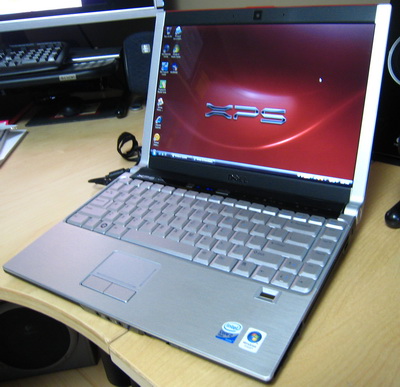
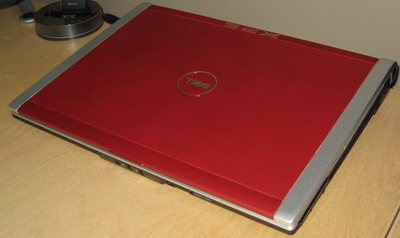
Yessssss, It Finally Arrived: my Dell XPS M1330

jd-dell-xps-m1330-day1.JPG

jd-dell-xps-m1330-day3.JPG

I’ve been playing with my new Dell XPS M1330 quite a bit over the past couple of days – after waiting forever for it, it’s great to finally have it in my hands. My first impressions, stream of consciousness style? Here we go…

It’s impressive. Incredibly fast. Great fit and finish. Love the red satin cover, love the aluminum on the inside. Slot load DVD drive is cool – but the eject button doesn’t always work. 802.11n is fast (I’ve connected up to 117 mbps), but seems inconsistent and I’m not seeing transfers speeds as fast as I’d expect. Only two USB ports – pity. No CompactFlash slot (darn). Came pre-loaded with Norton AntiVirus, Google Desktop Search, Google Toolbar, Google Desktop Sidebar – none of which I want, so I’ll have to reformat the whole thing and re-build it from scratch (grumble). Did I mention it’s fast? So damn fast – I installed City of Heroes and the video card (128 MB NVIDIA 8400M GS) handled it without a problem, smooth like butta’. The screen is gorgeous, very bright at max brightness, but so very dull at anything less than about 70% brightness. The 1280 x 800 resolution isn’t bad, but higher would have been better – why not 1440 x 900? If the Dell 14.1″ screen notebooks have an option for 1440 x 900, why not this high-priced beast?

Gonna’ see about getting 4 GB of RAM put in there, I’ll only get access to 3.5 GB, but hey that’s better than 2 GB. Lightroom runs great on this, the CPU is very fast (I got the 2.2 Ghz model). Overall the unit is very quiet, and you can only just barely hear the fan under heavy load. Seems to be some quirks with suspend/resume – it just takes way too long, screen flashes off and on, seems sloppy. My old XP-based Fujitsu upgraded to Vista is faster at suspend/resume, so this is just unacceptable. The fingerprint reader is a neat gimmick, but the software is sloppy and dysfunctional, I don’t know if I’ll use it. So far, I’d give this an 8 out of 10 rating as a laptop. Dell did quite good here, but my expectations were a touch higher for an XPS laptop that’s eight months into Vista’s cycle.

Firefox Memory Leaks

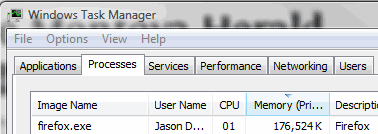
I really like using Firefox and think it’s a superb browser, but how has it gotten to the 2.x release state while still having incredibly sloppy memory management? Here’s how much memory it was taking at the end of a day with only four tabs open:

firefox-memory-management.gif

176 MB!? Closing it and re-opening it, with those same four tabs displayed, gave me 40 MB. So that’s 136 MB of RAM being used for no good reason. Come on Firefox guys, work on memory management and stability before adding any new gee-whiz features.

Here’s Why Dual Monitors Rock

I’m spending a rainy Sunday afternoon working on an article covering what’s new for Outlook Mobile in Windows Mobile 6, and I’ve never been so happy to have dual 24″ monitors. From left to right, I opened the following: an Excel spreadsheet with the article assignment and basic overview, a Word document with the article itself, another Word document that’s a 91 page reviewers guide to Windows Mobile 6 so I can make sure I don’t miss any of the new features, and lastly on the far right I have a PDF file that contains all of the copy conventions and trademarks – where to put the ® mark, etc. Being able to have all four of these documents open at the same time is simply awesome – it enables me to glance over and get the information I need, without having to take any file off my screen. If you do any sort of work that requires you to reference multiple files at once, a multi-monitor setup will give you a big boost in productivity.

Now if only these two monitors could get me to write faster…

Kudos to HP Live Chat Tech Support

Last November, almost a year ago, I was working on a laptop for a client and I had to re-format it because it was filled to the brim with digital cruft. Unfortunately, the client didn’t have the driver CD, so after restoring Windows XP I had to manually install each and every driver. That worked like a charm, except for the sound card. I figured I’d try HP’s chat tool to see if I could track down the driver. Here’s the transcript.

********************

Sean [HP Tech]: Hello Jason. Welcome to HP Total Care for Presario Notebooks. My name is Sean. How may I assist you today?

Jason Dunn: Hi there! I have a very simple question. I have the 3055CA laptop and I had to re-install Windows, and I don’t have the driver CD or the restore CD…I have all the drivers off the download page except one – there’s no driver for the sound card anywhere!

Jason Dunn: …so I’m baffled as to where I’d find the sound driver because it’s not on the download page for this laptop.

Sean: Oh! I see. No need to worry, let me check how can I assist you with this.

Jason Dunn: Great, thanks.

Sean: You are welcome, Jason. May I know the processor installed in your notebook?

Jason Dunn: Intel 2.8 Ghz I believe…sorry 2.4….but intel, not the AMD model. It took a while for me to figure out which WILAN driver to install, it’s bizarre how this exact model of laptop had so many different parts 🙂

Sean: No need to worry, I will try my best.

Sean: Please try with this one and let me know what happens. Here is the link: ftp://ftp.hp.com/pub/softpaq/sp28501-29000/sp28552.exe

Jason Dunn: Ok, downloading now.

Sean: Are you chatting me with the same notebook?

Jason Dunn: No, different PC. Installing now.

Sean: Wait…

Jason Dunn: While it’s installing, any idea why that driver wouldn’t be listed on the driver page for that notebook?

Sean: After downloading the driver softpack, Save it on the desktop or in the Hard disk and after that double click on that to install.

Jason Dunn: Yup, it’s installing now…almost done. Requires reboot, rebooting…got the windows sound at reboot, so it works.

Jason Dunn: Thanks so much! I appreciate the fast help, and the no-hassle about the laptop being outside of the warranty window 😉

Sean: You are welcome. Are you completely satisfied with our chat session today?

Jason Dunn: Yes, absolutely, this was great!

Sean: Thank you. A copy of our chat session will be e-mailed to you shortly. You may also receive a chat survey. We would appreciate your feedback.

********************

As you can tell, it was a quick, painless experience – I got exactly the driver I needed, and the tech didn’t bother to hassle me for the serial number or try to prove ownership. I had an HP notebook, I needed a driver, and he provided it for me. That’s the kind of tech support I love to see, so kudos to HP tech support for doing a great job. If only more tech support worked like this!
Vista’s Windows Update Needs Two Layers of Functionality

The automatic update functionality in Windows Vista has been really irritating me lately, and here’s why: by default Windows Update is set to install updates automatically at a certain time of day. That would be fine if no update required a reboot of the PC, but some do, and Microsoft still lacks the technology to capture the state of the system, apply the patch, reboot, and restore the system state. I learned early on to turn off this setting or I’d lose my work. The next-best option is “Download updates but let me choose whether to install them” – this works great for having system reboots occur on our own time frame, but it sucks because of one application: Windows Defender.

There’s a new Windows Defender anti-spyware update on an almost daily basis. That’s good for protecting me from spyware, but it’s a hassle because I have four PCs that I work on regularly. Basically every day I have to approve the installation of a Windows Defender update across four computers. That’s just a pain. There’s no good reason why something as simple as an anti-spyware profile update should be in the same category of update as a major system patch. Windows Update needs to evolve into a dual-layer system where minor updates that don’t require reboots can be installed automatically, and major updates require user permission. Or perhaps they could just add an option to not install patches requiring a reboot without user permission? There must be a way for an update to be flagged as reboot-necessary or not. Windows Update has to get better, and smarter.