NCIX Charging Credit Cards Without Shipping Products

Does anyone know what the laws are in Canada surrounding charging a customer’s credit card when you don’t actually have the product to sell them? Back at the beginning of March I ordered a Trendnet KVM switch from NCIX. They had the product I wanted listed, so I placed my order and they charged my credit card. A few weeks passed, and I emailed them to find out where my product was – and I was informed that the product was on order. I was a bit perturbed because there was no indication that the product would take 2+ weeks to arrive, but I needed that one specific product so I waited. It was just today, nearly six weeks later, that I decided to contact them again, and this is what I was told:

“We had been on backorder for this item, and we had yet to receive any stock since you placed your order. However, after checking with our suppliers, it appears that this item has been unexpectedly discontinued. Unfortunately, this means we will be unable to get this item in for your order. At this point you have the option to either change your order to another item, or have the item cancelled for a full refund. Please contact us back to let us know how you wish to proceed with this order.”

Products get discontinued – that’s no NCIX’s fault. But why on earth would they charge my credit card if they weren’t buying the product from the supplier? There was no indication that this was a special order – the kind where you pay in advance and they order the product in – so it seems ethically dubious for them to take $50 or so from me, hold on to it for six weeks, then inform me that the product actually can’t be ordered.

I think I’ll be avoiding NCIX for a while… 🙁

Green-Screen Scanning Makes For Easier Object Extraction

[The following is re-published from Digital Home Thoughts – if you’re going to link to this, please link there instead – thank you!]

I’m working on my first book project – one where I’m creating a vacation scrapbook on 13″ x 11″ pages inside FotoFusion and will export the JPEGs then get them printed up as full-bleed pages in a Blurb hardcover book. This is my first attempt at this type of a project, but I have high hopes it will turn out really nicely.

One challenge I had was trying to scan the little pieces of paper we brought back that weren’t perfectly rectangular, or things I wanted to layer over each other – plane tickets, train tickets, etc. When I scanned them, it was typically off-white on off-white (the background of my scanner). Even using Photoshop Elements’ Magic Extractor, I was unable to properly extract the objects – I tried tweaking the settings, tried masking it myself with the magic wand, etc. Nothing worked because the background colour of my scanner lid was just too close to the colour of my objects. I was beginning to think I wasn’t going to be able to accomplish the visual design I wanted. Continue reading Green-Screen Scanning Makes For Easier Object Extraction

How To Change the Spell Check Language in Windows Live Mail

On one hand, Microsoft’s Windows Live Mail client is a surprisingly good email client. On the other hand it’s completely baffling how/why they put Windows Mail in Windows Vista to replace Outlook Express, then stopped developing it (there haven’t been any improvements in over a year) and put out Windows Live Mail instead. Regardless, if you’re using Windows Mail, you should probably switch to Windows Live Mail – it’s a much better email program. I use it for my personal email – I have Outlook configured on my main dual-monitor workstation for my day to day work email, but on the weekends or evenings I like to check my personal email without having to fire up Outlook.

Windows Live Mail is great for that – except that it has an irritating limitation regarding spell checking. In short, it only spell-checks in US English – even if you have Word installed and Canadian English is selected as the default language. Silly! I asked if there was a way to change this in the Windows Live Mail newsgroup, and a helpful fellow named Ronald Sommer responded with the solution:

“Just for the record, it’s not an ‘errant file number’ – 1033 is Microsoft’s code for US English. 2057 is the equivalent for British English. If you’d prefer Canadian to British, change 1033 to 4105.

2. Close down WLMail.
3. Use Windows Explorer (or My Computer) to find a folder called Windows
Live\Mail\Proof\prf0009\2 in your Program files folder.
4. In there should be a file called spell.ini.
In XP, right-click on it and select Open with. Find Notepad in the list of
options, click on it and then on OK. The file will open; change 1033 to
2057, then File > Exit. When you are asked whether you want to save the
changes, click Yes.
In Vista, click start and type notepad. When the list opens, right-click
notepad and select “Run As Administrator”. Then select File > Open, find the
spell.ini file as above and amend it.
5. Restart WLMail and see if your spell check is working.”

No, I don’t know why he started at the #2 – but his solution works so I don’t care. 😉

Who Coded This Stuff? Outlook [Part 1]

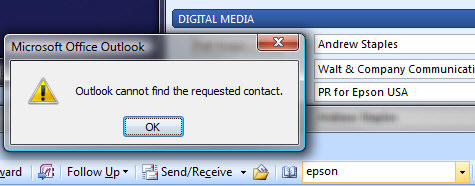
outlook2007-stupid-contact-search.jpg

On so many levels, Outlook 2007 is a superb product – I spent more time in Outlook than any other piece of software, including the Web browse, and for the most part it’s an excellent product. But in other ways, it’s just plain stupid. Take the “Search Address Book” feature. I use it all the time, but sometimes I only know a bit about the contact I’m looking for. Maybe his first name, or, more likely, the company he works for. Take the above screen shot: I’m searching for someone I know who’s in my contact list who works for Epson – so I type in Epson and hit enter. No contacts found. Yet look at the contact for Andrew – it says Epson in the business field. Why shouldn’t it find the contact? No good reason I can think of. Who coded this stuff? They can do better.

Remember the “CD-ROM Business Card”?

v-card.jpg

Just when you thought no one could come up with a worse idea than having a business card that you need to put into your computer…now someone has come up with the idea of giving our small portable media players as a business communications tool. Really? Seriously? Who’s going to want to accept a media player as a pitch device – even if it’s a cheap device, there’s a perception there that you’d want to give it back to the person, and you’d probably just refuse it to begin with because most people wouldn’t want the responsibility of having to give it back when they were done with it. I don’t know how much these costs, but even if they’re “only” $99 each, you’re still not going to give them out like you would a business card or brochure…

Windows Live Messenger: Great When It Works

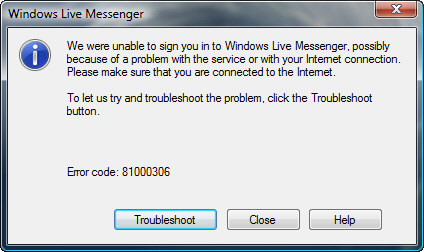
I’ve been trying all day to get logged into Windows Live Messenger, and keep seeing this:

windows-live.jpg

Instant  Messaging is kind of like email: you shouldn’t offer it as a service unless you can provide virtually perfect reliability.

jasondunn.com, Now iPod Touch/iPhone Icon Friendly

Courtesy of Mr. Darius Wey, if you add this site as a shortcut to your iPod Touch or iPhone, you should see a snazzy icon. You know, just in case this blog is just SO critical to your daily existence that you want to add it to your iPod/iPhone home screen. Bwahaha…

jasondunn-ipod-logo1.jpg

Keep Your Priorities Straight

This is an interesting article about the addiction that some people have to World of Warcraft, and what it can do to a marriage:

world-of-warcraft-20060712043912894_screen001.jpg

“Jocelyn had been friends with her ex-husband Peter since the age of 13, but it took only nine months for her marriage to collapse. “I bought the game for him for Christmas 2004, when it first came out. By May we had our first serious discussion about where our marriage was going, and by September I had moved out,” she said. Jocelyn recalled one particular incident that was typical of Peter’s habits. “I had set aside 30 minutes for us to watch a television show together, and he couldn’t. He was stuck on a raid, and completely failed to understand why I was upset,” she said. Peter’s domestic duties also suffered. He stopped paying bills, she says, and refused to do his share of the housework.”

This is clearly an extreme case, but certainly not unheard of. Anyone with an addictive personality would certainly have trouble resisting getting addicted to a game that has no ending. World of Warcraft is probably at the root of more marriage break-ups than any other game in history, yet if it wasn’t the game it might be any other number of things that person would get addicted to. Should the game come with a warning label on the outside? “Caution: May Be Harmful to Marital Harmony.” I believe that people are responsible for their own actions and that blamings games, music, or anything else is a cop-out.

New Iron Man Trailer Out + The Quicktime Player Sucks

There’s a new Iron Man trailer out, and it looks amazing – you can check it out in HD if you have Quicktime installed, although I had to chuckle at how badly it works because of Apple’s restrictions on the Windows platform. See, if you have a Mac, Apple lets you view Quicktime full screen – and who wouldn’t want to? But on Windows, Apple gave us a hobbled version of Quicktime that won’t go full screen – unless you pay $29.99 USD for the “Pro” version, which I haven’t done (why should I have to pay $30 to view a video?). So when I clicked to watch the deliciously high-res 1080p version of the new Iron Man trailer, which is 1920 x 1080, it loaded on my monitor (which is 1920 x 1200) with the play button off the screen. I couldn’t start the video until I repositioned the whole window to access the user interface, which was awkward. The fact that Apple considers full-screen video a feature worth paying for is quite ridiculous…

UPDATE: Well I’ll be…Apple added the option for full screen video in a recent dot-release of Quicktime (just press CONTROL+F) and I didn’t notice. It’s unlike most video apps in that double-clicking the video doesn’t make it go full screen, it just pauses it, and I didn’t think to check the menu. Thanks to Janak and Vincent for pointing it out…

Silverlight: Breaking New Ground

Microsoft’s Silverlight technology is really interesting, and it’s pushing new ground in a lot of ways – including being the first plug-in for Firefox that I’ve ever seen crash:

silverlight-firefox-crash.gif

I guess I should feel thankful that Microsoft even released a Firefox plug-in. 😉