Games Worth Playing: Arkadian Warriors

I find myself going through cycles with my Xbox 360: when I got Halo 3, I played it every morning for an hour or two until a few weeks later, I had beaten the game (and I still get trashed in online play – go figure). Then I didn’t touch my Xbox for a while, until firing up Mass Effect not too long ago. But just as I was starting to get into Mass Effect, I downloaded, played, and immediately purchased an incredibly fun Xbox Live arcade game: Arkadian Warriors.

arcadian-warriors.jpg

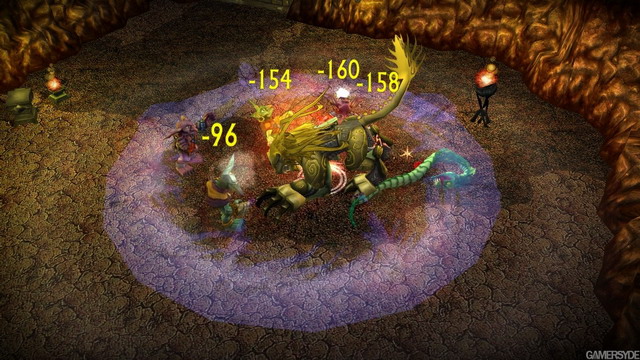
The game is immensely fun to play, reminding me a bit of a cross between a Zelda Game and Diablo. It’s fast to get up and running with, easy to learn, and doesn’t bore you with complexities. The RPG element is very “light”, with three choices for characters, and fixed skills that unlock at certain levels. It’s great for local co-op play, with two players sharing the screen at the same time (we need more games like that), and I imagine it’s equally fun over Xbox Live co-op play. Definitely one of the best 800 point purchases I’ve ever made on Xbox Live! <does the Google> Ah, I see that the developer of this game is the same company (Wanako Games) that created my other favourite Xbox Live Arcade game, Assault Heroes. No wonder I like it so much. 🙂

My Nose is Stuffed Up, But My Trigger-Finger Still Works

If there’s anything “good” about being sick, it’s that when your brain isn’t working properly enough for real work, there are usually enough functioning neurons to play a bit of the ol’ Xbox. I was given a copy of Mass Effect when I attended Mobius 2007 back in November, but I never got around to playing it until this weekend. What a fun game! It’s got the perfect mix of role-playing and action, something that attracted me to Bioware’s other RPG/action game, Jade Empire (I sure hope they’re working on a sequel). I’ve barely dipped my toe into the waters of Mass Effect, but I enjoyed the few hours I spent playing it a great deal – especially once I looked at the manual and figured out how to swap weapons. 😉 I also played, and purchased, the Xbox Live arcade game Battlestar Galactica – also insanely fun (but hard!). Pretty much anything that says “Battlestar Galactica” gets my dollars because I’m such a huge fan of the show. Maybe this year I’ll actually break the 2000 point barrier on my Xbox gamerscore!

My Precioussss….Nikon D300 and 24-70mm f/2.8 Lens Arrived

nikon-d300-arrived-jason-jan11.JPG

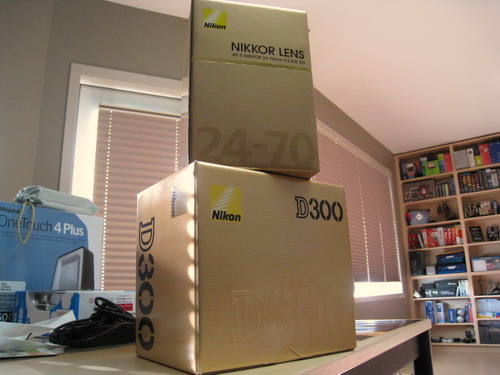
I know what I’m going to be spending my weekend doing: coughing, blowing my nose, and taking pictures with what is hopefully a fantastic camera!

One Trick for Getting Out of DNS Hell: Create a New Record to Force a Refresh

DNS issues with domains are, frankly, some of the nastiest, ugliest Web-based problems you can have. The reason why is that they involve computers that you can’t control directly (such as the 13 demi-god root servers). I won’t go into the ugly details about what happened with a family member’s personal domain today, but suffice it to say that it was one of this DNS situations where a DNS server wasn’t giving out the right information, and that had the chain reaction of breaking all sorts of things, including email. I spent 45+ minutes trying to convince their tech support people that something was wrong with one or more of their DNS machines (they couldn’t see it because they were connected to a different DNS), but I finally decided to try a long-shot and I added a new record (a CNAME) and voila, within an hour everything was working again. So, when faced with bizarre non-updating DNS records, create a new entry to force the update process to kick off again.

The 18 hours I Owned a Dell Vostro

A couple of weeks ago, I ordered a Dell Vostro 1000. Then I cancelled my order to buy an HP instead. Then I re-placed my order when the HP sold out before I could order it. When the Vostro arrived, right on schedule, it was pretty much what I expected when I unpacked it: big, black, bulky. It was a business machine after all, and I wasn’t buying it for looks. What I wasn’t prepared for, however, was how bad the 15.4″ LCD screen was.

I haven’t seen a screen that bad in years! It had a matte finish, which I was expecting, but the back-lighting was uneven and it was the most dull, lifeless screen I’d ever seen. Everything was also vaguely out of focus. I wasn’t expecting it to be that bad, and even though this machine was only going to be used for Web access and basic word processing, I wasn’t willing to grimace every time I used it. I figured I’d give it a few days of use to see if my initial gut reaction faded, so I began the long process of patching the Windows XP OS it shipped with (why Dell doesn’t ship the machine with the latest patches is beyond me). After getting it patched up, I uninstalled the Google junk it came with – I consider Google Desktop Search to be no different than the trial versions of the other applications that Dell’s consumer laptops ship with, and I thought the Vostro machines were supposed to be junkware free?

I used the included Dell Support software to check for newer drivers and whatnot. It’s bizarre that Dell’s support software tool isn’t useful enough to actually report to the user what version of a certain driver they have and then report if there’s an updated version or not. Instead, you have to go the driver page, look at the date on each driver, and guess if you think your Dell computer has that version or not. Ridiculous, no? I saw a few drivers and a BIOS release that looked quite new, and seeing as how Dell shipped me the Vostro lacking the past half-year or so of Windows XP updates, I figured the drivers might be equally out of date. I installed the drivers, then got to the BIOS update and let it run as well. At the end of the BIOS update, the laptop rebooted, and I sat staring at a black screen. Nothing came up after the reboot. I held the power button down, which forced the power off, and booted it up again – nothing. I then pulled the battery, left it for a few minutes, and tried again – nothing.

I was baffled as to how Dell could offer me a BIOS update that fried the machine, but I called tech support and they arranged for a courier to come and pick the unit up – this is after the tech told me that I had damaged the machine myself by updating the BIOS, but they’d repair it anyway. The courier was supposed to come on Friday, but didn’t arrive until today – the laptop is now out of my hands and off to be repaired.

Technically I still own the Dell Vostro, but as soon as it gets back from tech support, I’ll be calling customer service and sending it back for a refund. The poor-quality screen is the biggest reason, but the way the machine tanked after the BIOS update is the rotten cherry on top of this whole situation.
Dell: Come On, Give Me the Info!

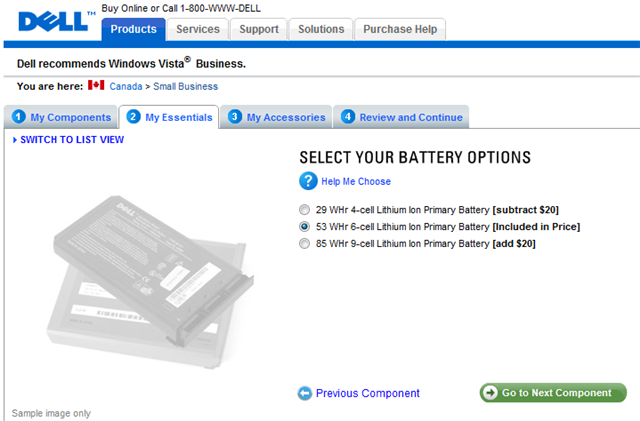
It’s a really great thing that Dell offers buyers multiple choices when it comes to laptop batteries: there’s usually a 4-cell, 6-cell, and 9-cell battery option. Dell always lists the watt hours information as well – great!

dell-battery-size.png

But what’s ridiculous is that there are no images, illustrations, or written information about the exact sizes of the batteries: specifically, which batteries will stick out of the laptop (the “hump”). This is a really important thing to know, because when I’m buying a laptop I usually want to get the biggest battery possible, but one that doesn’t stick out. I just ordered a Vostro laptop today (for my church) and was given the choice of three different batteries – yet no indication of which one(s) was actually flush with the laptop.

In general I find that the “More Information” links on the Dell Web site do a poor job of providing the customer with the information they need about the given accessory or feature option. The explanations of screen finishes are equally weak. I’ve posted this over on Dell’s IdeaStorm site, so if you have a minute (and agree with me), please go over there and vote for my request.

“Rationalize Like A Pirate” Day

1010-joy-of-tech.gif

Thankfully, no content-pirate that I know has given me this excuse, but it can’t be that far off given our current cultural climate…

Vista’s Irritating Me Lately

network-drives-broken.PNG

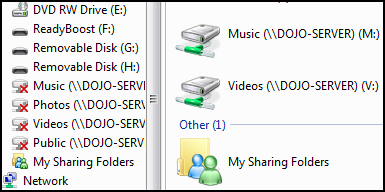
How can Vista be reporting my network drives as being broken in the folder pane, yet functional and connected in the Computer reporting. When I closed it and opened it again (Windows Key + E), it was reporting them as being connected. The most irritating of all though? When I tried to open the network drive, I’m getting an error about the drive not being accessible (“An unexpected network error occurred.”) This is all related to some funkiness with my Windows Home Server that has cropped up and is puzzling me. There are some things that I adore about Windows Home Server, and some things that are driving me nuts.

Back to Vista: I’m thinking about doing a week-long log where I keep track of everything that puzzles/frustrates me about Vista…but I’m worried that the results might be too depressing.

Don’t Take My Order for a Product You Don’t Have

There’s nothing worse for the perception of your company than when a customer of yours feels cheated or tricked – it’s hard for your brand to recover from that. Case in point: on October 1st I was (as always) keenly following Dell’s Days of Deals and they happened to have a Sony Digital Voice Recorder on sale for $69, a full $40 off the normal price of $99. Sometimes I have do to interviews for my Web sites and I thought it would be a decent solution for the price. I placed the order on October 1st at the special price. On November 1st, a full month later, I still didn’t have the product. I had been checking my order online every week or so, expecting it to say it had shipped, but no such luck.

Today I phoned Dell, and 35 minutes, one customer service agent, and one pause-prone (is that a cultural thing or a Dell sales thing?) Indian salesperson later I was told that the product was going to be back in stock in seven to ten business days. So if I’m lucky, it will be somewhere around the six to seven week mark after ordering that my product will show up. Seven to ten business days sounds suspiciously like a generic “I don’t actually know” answer, but I suppose it’s better than what the customer service agent suggested I do: cancel my order and re-place it, trying to get the same discount from online says.

I’ve seen Dell deals be sold out before, which is why I always check them first thing on the morning when the Day of Deals are on. If Dell didn’t have the product in stock, why take my order? It’s certainly not normal for Dell to take a month to ship products – the last product I ordered I received the very next day. I had been hoping to use this voice recorder when I went down to New York (I figured I had 20+ days for it to show up), but Dell betrayed my trust when it never arrived. Come on Dell: you’re supposed to be the master of the supply chain, can’t you show “out of stock” on a promotional deal when you don’t have any more to sell?

When Digital Devices Are Stupid

I have a big phone on my desk with a big screen. It has a big clock on it. Over the years I’ve had this phone I’ve become quite accustomed to looking at it to see what time it is, even more so than looking at the clock in the system tray of whatever PC I’m looking at. The problem? It has a built-in time adjustment for daylight savings time – which would normally be helpful – but since the US of A decided to change DST, and Canada followed along, my clock has been one hour slow since the old DST date. If I change it manually, it changes back to what it thinks is the correct time. There’s no option to override this, there’s no way to change it. And because it’s landline phone, there’s no firmware update to fix this problem once and for all. That’s a stupid digital device. I’ve heard so many pros and cons about DST I don’t know who to believe any more, but I do know that it’s frustrating to have a clock that’s been giving me the wrong time for a few days now. 😉