As if I didn’t already realize how little I wrote here in 2014, the very cool WordPress JetPack plugin/service sent out an email showing me exactly how little…2015 is going to have a lot more green boxes!
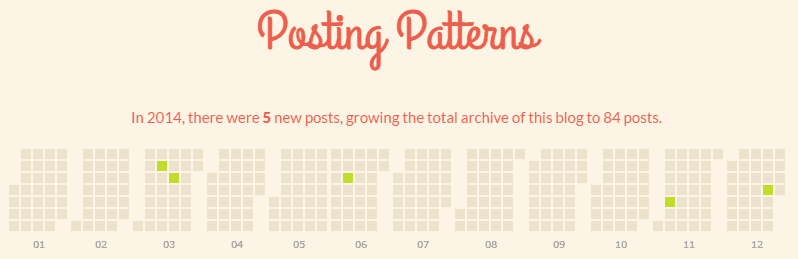
As if I didn’t already realize how little I wrote here in 2014, the very cool WordPress JetPack plugin/service sent out an email showing me exactly how little…2015 is going to have a lot more green boxes!
Twitter, like all social networks, doesn’t come with a rulebook. Sure, there are technical limitations to what you can and can’t do with it, but just like all flexible communication technologies that came before it – faxing, email, texting, IM, etc. – the way it’s used is defined by the people who are using it. Different peer groups will have different implementations; the way two 30-something’s text is radically different from the way two tweener’s text.
Twitter is no different. Over the couple of years I’ve been using Twitter, I’ve been surprised – and sometimes amused – at the friction caused by mis-aligned expectations of how Twitter “should” be used. I’ve been asked a couple of times to explain how I use Twitter, so here’s that long-overdue blog post.
I think in general there are two camps on Twitter: those that treat it like a river and those that treat it like a glass of water.

Twitter as a River: Your Twitter stream is a rushing flow of information. You follow many hundreds or thousands of people, and what you see from them is what is in your feed when you open up your Twitter client. You see what’s flowing when you step into the river, and when you step out, everything keeps flowing. When you come back to it, what came before doesn’t matter because there’d be too much to try and read. You can follow as many people as you want because unless they have an ultra-high output on Twitter, you may never see what they tweet. Oh, and if you’re following thousands of people and claiming you’re reading everything they tweet, you’re either lying or unemployed (or maybe both).
Twitter as a Glass of Water: Your Twitter stream is a large glass of water. It’s something you can drink in one sitting, or maybe you sip it regularly throughout the day. You follow a few dozen people (or maybe a hundred low-volume streams), but you read everything they post. When you load up your Twitter client, you scroll back to read what you missed. You take it all in.
I treat Twitter as a glass of water; right now I follow around 100 people/companies, but more than half don’t even post daily. The exceptions are sometimes Engadget and Business Insider; their output is so heavy I often skip past Tweets (especially Business Insider – I’ve unfollowed several times because they tend to get pretty spammy).
When I start to follow someone, I’m going to read everything they post. If, after a few days/weeks their Twitter subject matter isn’t interesting to me and/or their volume of tweets is overwhelming, I un-follow. I could say it’s nothing personal, but it kind of is – your Twitter stream is a partial reflection of who you are as a person, and what interests you. I think Twitter works best when people find the topics that interest them the most rather than the people (unless the person they’re following is consistently tweeting about one topic).
When I un-follow someone on Twitter, and they notice and ask me why (which is a bit awkward in itself, but I don’t shirk from answering), my response is typically along these lines – that they either tweet too much for me (too much noise and not enough signal), or what they’re tweeting about is on a topic that doesn’t interest me. I’m not offended if someone stops following me on Twitter, but I tend to find most people don’t share that reaction – I’ve had more than a few people get offended and hurt when I stop following them. I don’t know if there’s a way around that without being dishonest.
I don’t pretend that everything I tweet is going to be of interest to the whole world, but I do try to post thoughtful comments or questions that add value in some way through insight, humour, or something I’ve discovered worth sharing. I do not tweet “Good morning”, I do not tweet “Good night”, I do not tweet that I’m hungry, or that I’m sleepy. I ask myself with every tweet if what I’m posting is worth a few seconds of someone’s time or not. How I wish more people did that! If, however, you’re using Twitter as a personal diary and posting only for your own benefit, that’s fine – but don’t get offended when someone doesn’t want to follow you.
Ultimately the strength of Twitter is that I can follow you without you following me; it’s an asynchronous system that works well, even when we all have different ways of using it.
River image courtesy of this site; glass of water courtesy of this one.
As I transition from my old life to my new life – that sounds so dramatic, doesn’t it? – I’m letting certain domains lapse and taking projects from an “archived on their own domain” state to a “archived on this site” state. I think the Internet is one of the greatest made-made creations there is, and I hate to see any of the information shared on it – no matter how trivial – be obliterated.
I’m especially thankful to the creators of HTTrack Website Copier for making a tool that allows people like me to take our work and archive a whole domain’s worth to a single folder. Comments get lost in the case of a WordPress blog, which is a shame, but it’s a small price to pay for the ability to archive an entire site.
I won’t pretend that archiving the site below is anything other than an ego trip of wanting to remember the work I did in years past, but as someone who has a passion for keeping digital memories of all sorts, this is something I’d been planning for a while.
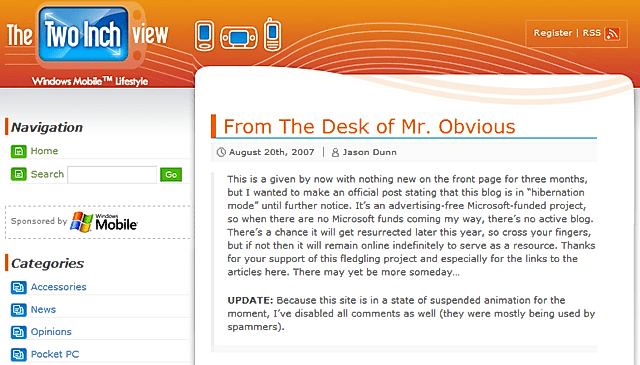
The Two Inch View was a Web site I created under contract for Microsoft. This was back in the heady days of Pocket PCs, Smartphones (note the capital “S” on that), and Portable Media Centers (a.k.a PMCs). A contact of mine at Microsoft wanted an “instant content portal”, so I created one. It was all real content, written by me, but it was created to support specific marketing pushes – each month I’d suggest topics for them, and we’d decide what would get written about. It was a fun little sandbox to play in, different from Pocket PC Thoughts and my other sites.
The amazing WordPress theme was designed by my friend, Fabrizio Fiandanese, and I recall getting several messages a month asking where I got the WordPress theme from, whether or not it was for sale, etc. It was a beautiful Web site for its time (and still is).
In my current role for HTC and dealing with vendors, I kind of chuckle at some of the ways I thought back when I did this project…if only I knew then what I know now! Enough talk, into the archives it goes…
Truer words have never been spoken: you don’t start with a cool technology and try to market it to customers…you start with the need of a customer, find the cool technology to address that need, then market the solution. It will sell itself. I’ve lost count of the number of products I’ve seen/reviewed where the technology is all the product has going for it; the customer experience is a disaster. I wish more companies understood this…
I got my hands on my first Android phone a couple of weeks ago – an HTC Incredible S – and it was of the Euro/Asia 3G frequency variety. That means I wouldn’t be able to use it on the Rogers network here in Canada. I really wanted to test this phone out though, so I figured a relatively easy option would be to get a SIM card from Wind – they happen to operate on the 1700/2100 frequencies – and simply forward my old cell number to this new number. Seemed simple enough, right?
When I got home though and put the SIM into the new phone, I was impressed at how everything was automagically configured. Within the first day though, I noticed something really weird: my device said I was roaming. On Android – or on this Android phone at least – every time it happened I’d get a pop-up window I’d have to dismiss three times. I decided to call Wind today to ask them if this was normal, and they directed me to their coverage map…and I was surprised by what I saw.
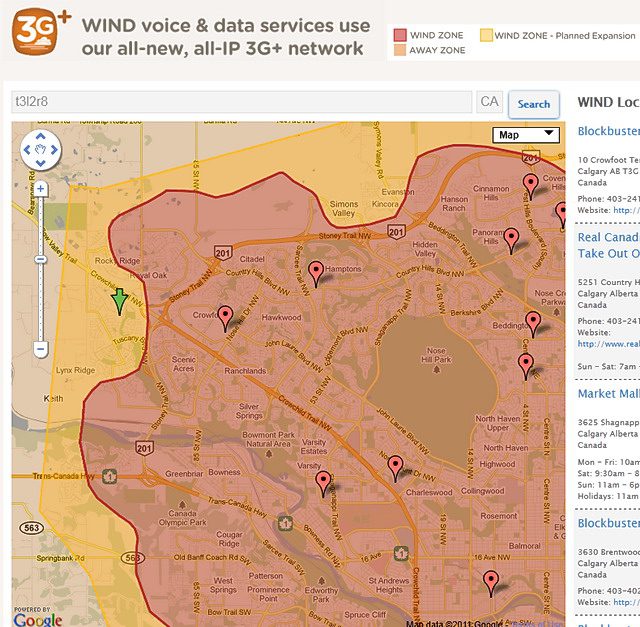
That little green arrow? That’s me. Yes, the community I live in is on the western edge of the city, but it’s still part of Calgary and the Wind Mobile coverage ends about 2 KM from my house. Because I’m on the edge of the coverage, it sometimes works, but not reliably so. When I bought the Wind SIM I knew I was buying into an urban wireless network, but I thought for sure they’d at least cover the entire city. Nope.
The good news is that I’m in the planned expansion area – the yellow is where they expect to expand to by the end of the summer.
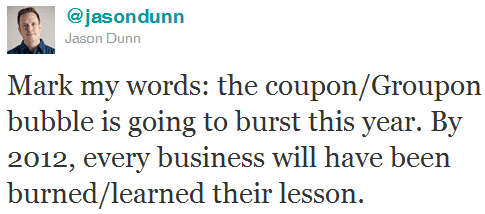
I posted the above status update earlier today, and when asked to explain myself on Facebook, I wrote up a rather lengthy explanation that seemed worth of turning into a blog post…so here it is (slightly edited for clarity).
I’ve talked to a few small businesses now that have used these new coupon services, and in every case so far, they’ve been financially maimed by them. Some due to their own ignorance or poor financial understanding, some by the salespeople at the deal companies.
A carpet cleaning company used Kijiji and the salespeople wouldn’t allow him to put a limit on the number of coupons sold – because they wanted to gain as much revenue as possible from it of course. They charge 50%, like everyone seems to, and still tacked on another 2.5% in credit card processing fees. Talk about adding insult to injury. Thankfully for him, only 150 people ordered the carpet cleaning – he was smart enough to spread out the appointments, only booking the Kijiji deals three times a week. That makes it frustrating for customers like me to get the service in a timely fashion – it took two months for me to get my booking in – but given that he’s working at 77.5% off his normal price, he’s only breaking even on supplies and travel costs…so his labour is free. Hard to feed a family on that!
In my case he made some money – I had him do two sets of stairs, which weren’t a part of the deal – but he said nearly every time people only want what the coupon covers. So as soon as he hits 500 square feet of carpet cleaned, he stopped.
Most businesses hope for repeat customers, but the type of customers that use deals like these are usually the kind who aren’t willing to pay for a service at full price in the first place. So you end up with people using your service at no profit to you, and you don’t get many new customers out of the deal. There are some exceptions: the guy that did our carpets did such an amazing job I’ll absolutely use him again, paying full price and b happy about it. I think that’s rare though.
Some deals can scale, no matter how many coupons are sold. I just bought a $10 for $20 at Old Navy for example. Old Navy could sell 10,000 of them and their stores could handle the extra traffic just fine. But the small carpet cleaning business, if he suddenly has 500% more clients than before, it soaks up all his excess capacity (good) but also uses up all his future capacity for the next six months (bad), at no profit. I heard of a cleaning company that went bankrupt because they sold too many coupons – again, because the company wouldn’t let them restrict the number of coupons sold – and it was easier to go bankrupt than to absorb the losses of the poor business decision of using the coupon service.
I don’t know about you, but I’ve been using Bing more and more lately – and for the most part, I’ve come away quite impressed with the search results I’m getting. I’m starting to see results that are even better than Google in some ways, which is excellent – Google allowed their index to become infested with spammy results. One area that Bing needs big improvement in though is maps – Google has a strong lead there in my opinion. The screen shot below is a perfect example of how Bing struggles to give proper directions:
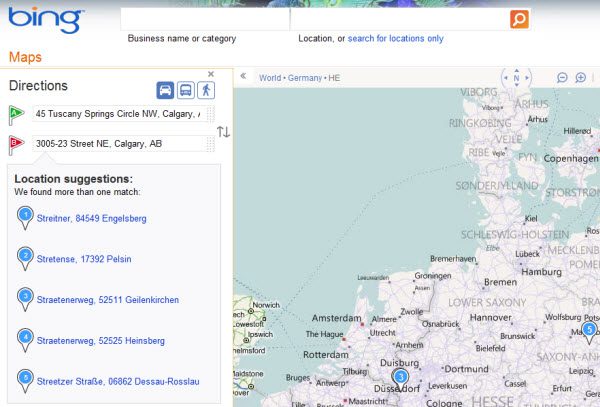
Both of those addresses are in Calgary, yet look at where Bing thinks the destination is…Europe! How it can get delivered the keywords of Calgary and AB (Alberta) and get Europe is beyond me. Time to tweak that code Microsoft!

The above screenshot is from a newsletter that I received today, and it’s pretty normal for me to see broken images in a newsletter, or images that take so long to download, they might as well be broken. We live in a world where there are all sorts of tools and services to monitor the up-time and performance of a Web site, and yet little to no attention gets paid to the up-time and performance of email newsletters. When I get an email about a sale at a big box retail store and the images in the newsletter take 60 seconds to load, that doesn’t make me think very highly of the brand in question. If you have an email newsletter, do yourself a favour and make sure it delivers the kind of experience you want your customers to have.
And in case anyone is wondering, the images were still broken after I gave Outlook permission to download the images…