Outlook 2007: Auto-Purge Rocks

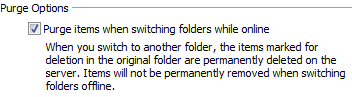
No, it’s not a feature for aspiring bulemic models, it’s a feature that’s a time-saver for anyone using IMAP email accounts. When you delete a message via IMAP, it stays on the server until you manually click on the “Purge Deleted Email” (not the exact wording) button in Outlook. And that button isn’t on any toolbar – it’s a menu item that you have to drag to a toolbar to get easy one-click access to it. Outlook 2007 adds an option below that’s pretty self-explanatory:

outlook2007-purgeoptions.gif

That means no more clicking to clean up your deleted items! Excellent.

Blogger Irony: Mock and Thou Shalt Be Mocked

Ah, the irony of it all. Yesterday I posted about the crazy eBay sale of bent and trashed CPUs. Over the weekend I assembled a new Shuttle, an SN25P, which was to be my photo/video editing workstation. I put in the AMD 64 X2 Dual-Core 4400+ CPU, a socket 939 chip that I paid around $550 for in 2006, which now sells for $215. I wanted to maximize performance, so I started to overclock it – the Shuttle allows for a fine degree of overclocking, including voltage bumps in one-half volt increments. I rarely do overclocking with voltage bumps, because I’m worried about damaging the CPU. So I did my normal bus-only overclocking. I got about 100 mhz out of the CPU, but I wanted more, so I bumped the CPU voltage up half a volt and juiced the bus speed a bit more. I got it up to around 2480 mhz or so (stock is 2200 mhz), but in testing it wasn’t very stable – it would lock up the system after a few hours. I let it run overnight on Friday night and Saturday morning I was staring at an ugly bluescreen (and this is running Vista Ultimate).

I played with it some more on Saturday, and it seemed to be more or less stable, but on Sunday it crashed again so I dropped the voltage back down to normal. I dropped the bus speed down to nearly normal, keeping around 50 mhz of extra speed. Everything seemed normal. Then late Sunday afternoon I went down to my office and tried to use the machine but the wireless mouse and keyboard wouldn’t work. I re-associated the mouse and keyboard, but it didn’t help. I pressed the power button on the machine and nothing happened. That’s when I realized that it was actually frozen (I should have looked at the system clock). I pressed the reset button and it rebooted, but wouldn’t post – the fans were stuck in high RPM mode, just like the Velocity Micro was doing when it had the CPU problems. My shoulders slumped when I realized that I likely destroyed the CPU with my overclocking attempts. I tried to remove the heat sink, but it wouldn’t budge despite my gentle wiggling, so I had to apply a bit more force than normal. It came free with a big sucking sound (how appropriate) and tore the CPU free of the socket without me releasing the socket lever (which was impossible to get at without first removing the CPU cooler). Almost a dozen pins were bent and maimed by the bad removal. I don’t know if I put on too much thermal paste, but I’ve never seen anything quite like that before.

I still had the 3500+ socket 939 CPU, so I put that into the Shuttle and it booted up perfectly. So it’s definitely the CPU, and between the pins being bent/broken and the fact that it wouldn’t boot, it’s a dead CPU. That was a rather expensive learning experience. 🙁 On the plus side, since I no longer have a socket 939 to power the Shuttle, I don’t need it any more – I returned it to Memory Express today. That means I can get a new Shuttle, with a new, modern CPU. 🙂 I’ve asked my Shuttle contact for an SD37P2 – fingers crossed…
Smokin’ Dell Deal

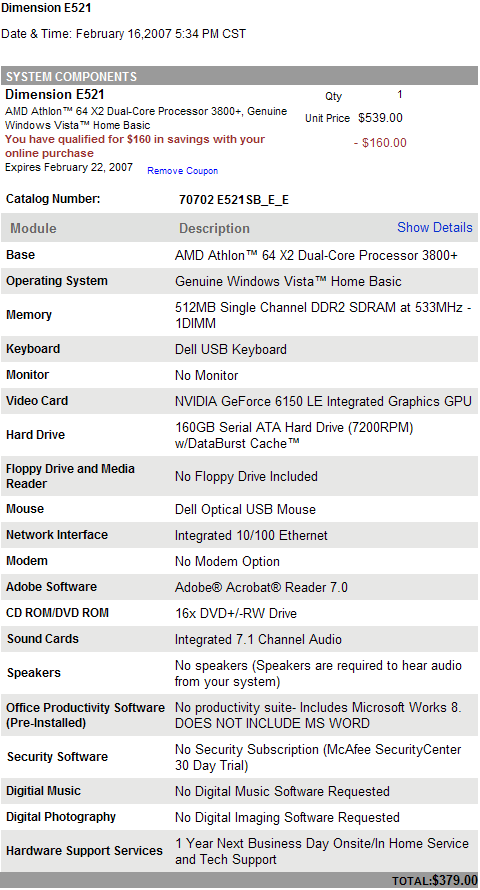
Sometimes it pays to be sitting in front of your computer when an email comes in. I received an email from Dell yesterday (they send one almost every day) but this time it was actually something special: a $160 discount on the first 200 machines sold using a coupon code. It might seem odd that I’d order a Dell computer after just having my Dell monitor go defective, but I need a new baseline computer for testing hardware and software – my previous system for this purpose is now the Windows Home Server test machine. I wanted a computer that I could test video cards, RAM, and add-in cards with. I upgraded the CPU to something decent – the AMD Athlon 64 X2 Dual-Core 3800+ will do nicely, and everything else can be upgraded fairly easily (though the power supply will undoubtedly be limited and stop me from testing any truly crazy video cards). Here are the specs for the machine:

dell-smokin-deal-feb16.gif

All that for $379 – not bad at all! I’d be hard-pressed to buy a decent motherboard and a case for $379, let alone a CPU, RAM, hard drive and DVD burner.

Well That Just Ruined my Day: a Dead Pixel on my Dell 2407WFP Monitor

dell-2407wfp-dead-pixel.jpg

See that blue dot? That’s a dead pixel. And that’s a dead pixel on one of my three new Dell 24″ LCD 2407WFP monitors. The same monitors that I declared were perfect after my long struggle with trying to get three proper monitors. For the record, I’ve ordered 11 monitors, spent $8465.16, and waited five months to finish the seemingly simple task of getting three Dell LCD monitors that didn’t have dead or stuck pixels. A few weeks ago I thought the Sisyphian task was completed, but today upon seeing that stuck pixel I knew I wasn’t. I’m about a week over my 30 day return policy with Dell, so I can’t take the route I took previously of returning the monitor and ordering another one. I am going to give up and accept the stuck pixel? Absolutely not. I remain convinced that if a Dell customer such as myself is willing to spend $2300+ on monitors, they shouldn’t have to accept flaws products – and a monitor that developers a stuck pixel after being active for less than a week (I just set up two of the monitors last weekend) is indeed a flawed product.

You Put The Peanut Butter Into the Cookie Jar…

I have a vague memory of  a Sesame Street skit with Bert and Ernie, where Ernie put the peanut butter into the cookie jar, and the cookies in the sugar jar, then the suger into the fish bowl, and the fish into the…whatever. You get the idea – swapping things around to make space, but you always end up with something that needs to go someplace else.

Last weekend I spent the majority of Saturday and Sunday working on the PCs in my office. I’ll write up a different post about the Velocity Micro PC (yes, it’s finally working), but it was the piece of the puzzle that was missing (like a cookie jar). I couldn’t do anything with my machines until it was working properly – oh, and that XFX 7600GS video card that I was waiting for as well. Once I started tearing down my PCs to put Vista on them, I also decided to swap parts around to get the best performance where I needed it the most. That meant taking the XFX 7600GS video card (passively cooled, totally silent) and 2 GB of Kingston RAM from my main workstation (a Shuttle SD11G5) and putting them into the Velocity Micro machine, taking the 2 GB of high-performance RAM and high-performance ATI Radeon 1950 from the Velocity Micro and putting them in the Shuttle SD11G5. Why? Well, the Velocity Micro PC is going to be serving as my TV recording/music storage PC, so it didn’t need either the high-performance RAM or video card – it’s hooked up to a Dell 26″ LCD TV that is no good for gaming. Swap one complete.

Then I had a medium-sized tower PC that I was using to test Vista on, recently wiping the hard drive to install the Windows Home Server beta on it. This PC had a 3.2 Ghz Celeron CPU in it (overclocked to 3.4 Ghz if memory serves), 1 GB of RAM, a 120 GB hard drive, and a Radeon 9600 GPU. Fine for testing Vista with (even with Aero Glass), but overkill for Windows Home Server. Then I had a Shuttle SN95G5 machine that I had been using as my Windows Media Center 2005 PC for the past couple of years. Great machine, and with the Velocity Micro now taking over that role, I was going to use it as a dedicated photo/video/audio editing workstation (my 17″ Fujitsu laptop just wasn’t cutting it). One of the three Dell 24″ LCD monitors I purchased was also going to be dedicated to this task. Unfortunately when I started to install Vista on the SN95G5, I was seeing it hang at boot. I poked around in the BIOS, but couldn’t solve the problem, so I dropped Shuttle tech support a line. Turns out the AMD 64 X2 4400+ CPU I had put in there last year wasn’t fully compatible with the motherboard – it would work fine in Windows (it had been working great) but the system would have trouble booting with it in (well that explains a few things). Continue reading You Put The Peanut Butter Into the Cookie Jar…

Flexible Software Licensing Plans

I want to give a shout-out to the people at ActiveWords, a product that I rely on every single day. I read about their licensing plan today:

“People who adopt ActiveWords want it available all the time, saving them time and making their computing more spontaneous, relevant, and enjoyable. We want to make sure our customers know they are free to take their ActiveWords with them, to use on any computer, anywhere, for the price of a single license. The ActiveWords PLUS Personal Version License gives our customers the unrestricted right to install and use the purchased version on any computer. As a customer you can unlock any ActiveWords PLUS installation for your exclusive use. This means you can use it on any computer, anywhere, anytime. This applies to the version of ActiveWords PLUS you purchase so long as it operates with a compatible Windows operating system.”

This is the way all software should work: it’s delusional how some companies think that every computer should have a unique license for their software, even if it’s the same person using it on each computer. Wouldn’t it be great if all companies were that flexible and friendly with their licensing? I’m far more inclined to purchase software that I know won’t give me a hassle when I install it on any or all of my five main PCs. Companies that treat me like a valued customer, instead of a software pirate, will always get my money first.

Now I just wish it wasn’t so confusing to unlock their software once you have the registration key…

Velocity Micro: Raised From the Dead

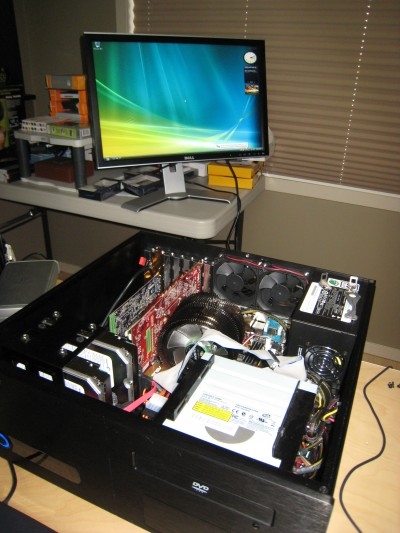
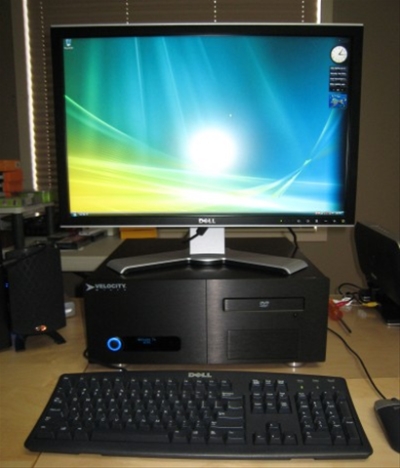
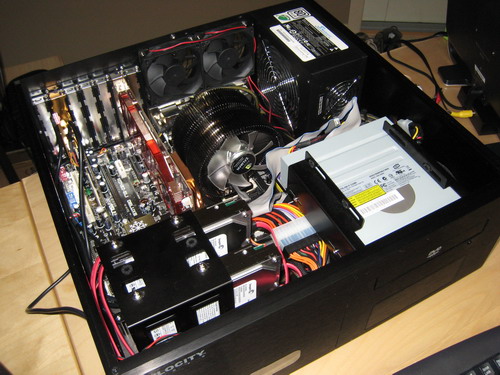
That’s right – technology miracles do happen! And, that’s right, I had a bizarre setup for that boot test. 😉 Acting on the suggestion of my contact at Velocity Micro, I took off that massive Zalman cooler and looked at the CPU – it was partially dislodged and some of the CPU pins were bent. I carefully bent the pins back (it’s microsurgery without the benefit of cameras or view magnification) and put the CPU back in, placing the Zalman cooler loosely on top. Much to my amazement, the damn thing booted up! It gave me a warning about a “degraded RAID configuration”, but thankfully it still booted into Windows Vista.

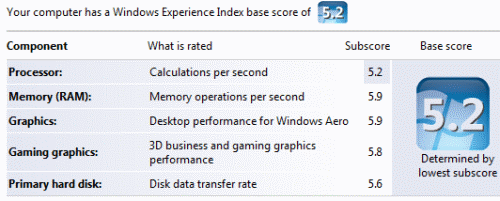
After finding some instructions on how to properly re-assemble the cooler on Zalman’s Web site, I put the computer back together and gave it a more proper setup. This machine will be used as a media center, so it will eventually end up in the corner of my office attached to my Dell 26″ LCD TV. Now that it’s actually up and running though – wow – it’s a screamer! Vista absolutely flies on this thing. Check out these Windows Experience Index scores:

This is the first Windows Vista computer I’ve seen where the CPU is the lowest part of the score. And when you consider that the CPU in question is an AMD Athlon 64 X2 Dual-Core 5000+, running at 2.6 Ghz, the CPU is by no means “slow”. It’s the most powerful CPU I have at my disposal now. I’m not sure if it’s the 65 nanometre or 90 nanometre version – I suspect the 65nm, but I’m waiting on a confirmation of that from Velocity Micro. Continue reading Velocity Micro: Raised From the Dead

Dell Still Putting Craplets on Vista Computers

laptop-screenshot.png

That’s a screenshot of the toolbar on a brand new Vista Home Premium laptop that my mother-in-law ordered (an Insprion 6400 to be exact). Look at all that stuff! Many of them are Windows icons, but I resent the fact that Dell pre-loaded the machine with an entire suite of Google software. Vista already has an excellent built-in search function. Why pre-install Google Desktop Search and have two indexing engines running on the laptop at the same time? The Google toolbar was also installed, along with who knows what else. The typical Norton “free trial” was there as well, along with a couple of other icons that I don’t recognize. It took me about 90 minutes last night to wipe the drive, re-install Vista, and get all the drivers off the CD installed. Dell definitely makes this process as easy as they can, though I’d really prefer not to have to do it at all. Why not have a perfectly clean install of Vista then, upon first boot, give the customer the option to install the suggested programs? Leave the power of the decision in the hands of the person who paid for the product. Yeah, I know Dell operates on thin business margins and they make some money from the companies whose software is on the machine, but that’s no excuse.

Can you imagine buying a brand new car and having bumper stickers from Subway, Coke, Cialis, and Jenny Craig on the back of it? “Oh, we put bumper stickers on there to subsidise the cost of the car” says the salesman. “You can just scrape those off”. We’d never accept that from a car dealership, yet it’s exactly what we get from the major OEMs like Dell and HP. I’d happily pay an extra $10 to Dell just to get a machine that had no software installed on it beyond their basic Dell support applications.

Velocity Micro: Round 3 K.O.

velocity-micro-third-try.jpg

That’s the guts of the third PC that Velocity Micro has sent me. I plugged it in (after finding my own power cable, they forgot to send me back the main accessories box), turned it on,  and just like last time, it didn’t boot up. I wish I could say I was surprised, but I wasn’t. Based on the track record so far from Velocity Micro, I was actually expecting it not to work. This time I decided to trouble shoot it a bit more: last night I swapped out the video card (no change) and I ran a 50 foot power extension cable to another socket in my house, on the off chance that it was a power issue (highly unlikely, but I was getting desperate). That didn’t help either. This morning I received an email from my contact at Velocity Micro who suggested that it might be a partially un-seated CPU. I’ll disassemble the huge Zalman cooler and see if that helps…but at this point I’m very close to just cannibalizing this thing for parts and building a new machine from scratch.

WordPress Spell Check: Does This Thing Work At All?

I find myself a bit baffled by WordPress 2.1 at the moment. The spell check functionality doesn’t work at all for me. Look at the spelling of the word defaults below – “defults” – and the spell checker says there’s no problem. I don’t think this is an instance of Canadian vs. American spelling either. 😉 I did a bit of searching but can’t find anything about how/why the WordPress spell check feature would not work. Anyone have any ideas?

wordpress-spellingmistake.png